
Artifacts, Edge Cases, and the Future
How to read a frame-generation artifact, and where the field is heading.
We have walked from a single triangle on screen all the way to a transformer network inventing entire frames that were never rendered. In this final chapter we tie it together by classifying the artifacts you will actually see every one of them traceable back to a specific stage in the pipeline and looking forward to where reconstruction is going.
Artifact taxonomy
A precise vocabulary for what goes wrong:
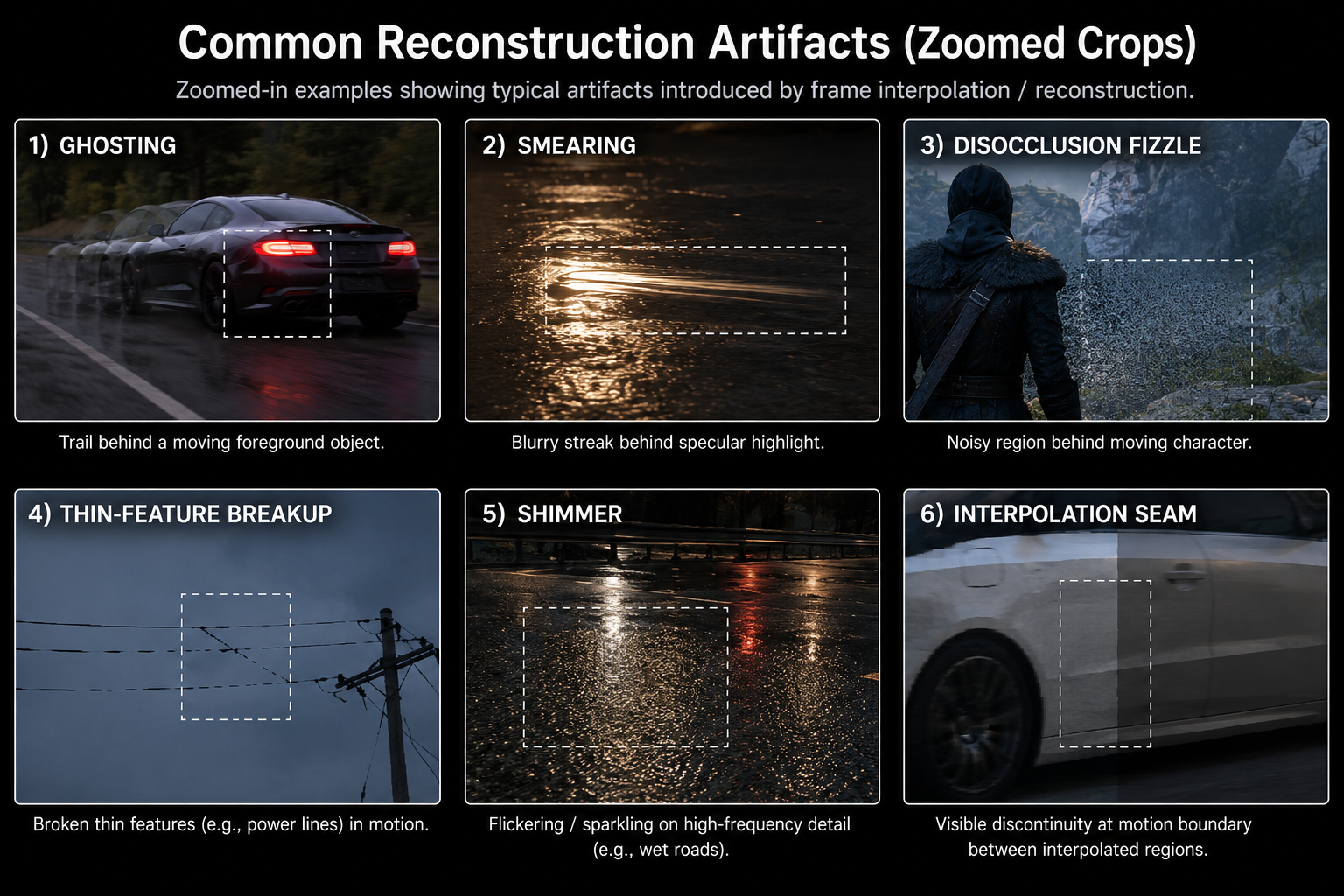
Ghosting
A faint trail behind a moving object. Cause: history accumulator keeps mixing in stale pixels because either (a) the motion vector under the trail is wrong and history validation was fooled, or (b) the network failed to detect the disocclusion.
Where to spot it: behind fast-moving foreground objects against a uniform background. Worst on transparent surfaces, particles, and visual effects that engine motion vectors don't describe.
Smearing
A blurry streak along the direction of motion. Like ghosting but worse and more directional. Cause: the network averaged too many history samples in a region where motion was estimated incorrectly, smearing each contribution along the wrong path.
Where to spot it: behind moving specular highlights, behind shadows of moving objects (especially on PC titles with engine MVs but no optical flow), and on reflective surfaces in motion.
Disocclusion fizzle
A noisy or "broken" region revealed when something was uncovered. Cause: until enough new samples accumulate, the network has only one or two jittered low-res samples to work with in that region, so it falls back to a near-spatial reconstruction with no anti-aliasing.
Where to spot it: behind a moving character against a complex background, or when the camera turns and uncovers a new region.
Thin-feature breakup
Power lines, antennae, hair, fence wires flicker, dash, or disappear in motion. Cause: the feature is sub-pixel at internal resolution; at higher upscaling factors it does not contribute to enough jittered samples; the network gives up and treats the pixels as noise.
Where to spot it: panning past distant geometry, or in fine 3D detail at lower DLSS presets.
Shimmer / temporal aliasing
A flickering pattern on high-frequency texture detail, especially specular reflections off rough surfaces. Cause: when neither TAA-style accumulation nor the network's filtering converges, the per-frame variation in the sample positions produces visible noise.
Where to spot it: wet roads at night, water surfaces, distant foliage.
Frame-generation-specific artifacts
When you turn on Frame Generation, two additional classes appear:
- Interpolation seams: at the boundary between regions with very different motion (a foreground object against a background moving in the opposite direction), the generated frame can have a small visible discontinuity. This is the network's confidence mask failing.
- UI ghosting: covered in chapter 9. Best fix is to composite UI after FG.
- Sub-frame stutter: even when the average frame rate is high, the spacing between generated and rendered frames may not be perfectly even, causing a low-frequency rhythmic "tick" that looks like very mild stutter.
Diagnosing artifacts in the wild
Given a screenshot or video of a glitch, you can almost always identify the cause:
- Is the artifact moving with an object? Probably wrong motion vectors for that object. Likely an engine-side bug.
- Does it appear only at lower DLSS presets? Sub-pixel feature problem; the internal resolution is too low to retain the feature.
- Does it appear specifically with FG on, but not in stills? Interpolation network struggling usually with a region where flow estimation is ambiguous (transparency, reflection, particles).
- Does it appear right after a cut or camera teleport? Disocclusion / history reset. Unavoidable; usually clears in 4–8 frames.
- Does it sparkle in static stills? Inadequate temporal stability. Usually fixed by an updated DLL.
This is the same checklist Digital Foundry and similar outlets use for the technical breakdowns you have seen. Now you know what they are actually looking at.
What the engine can do about it
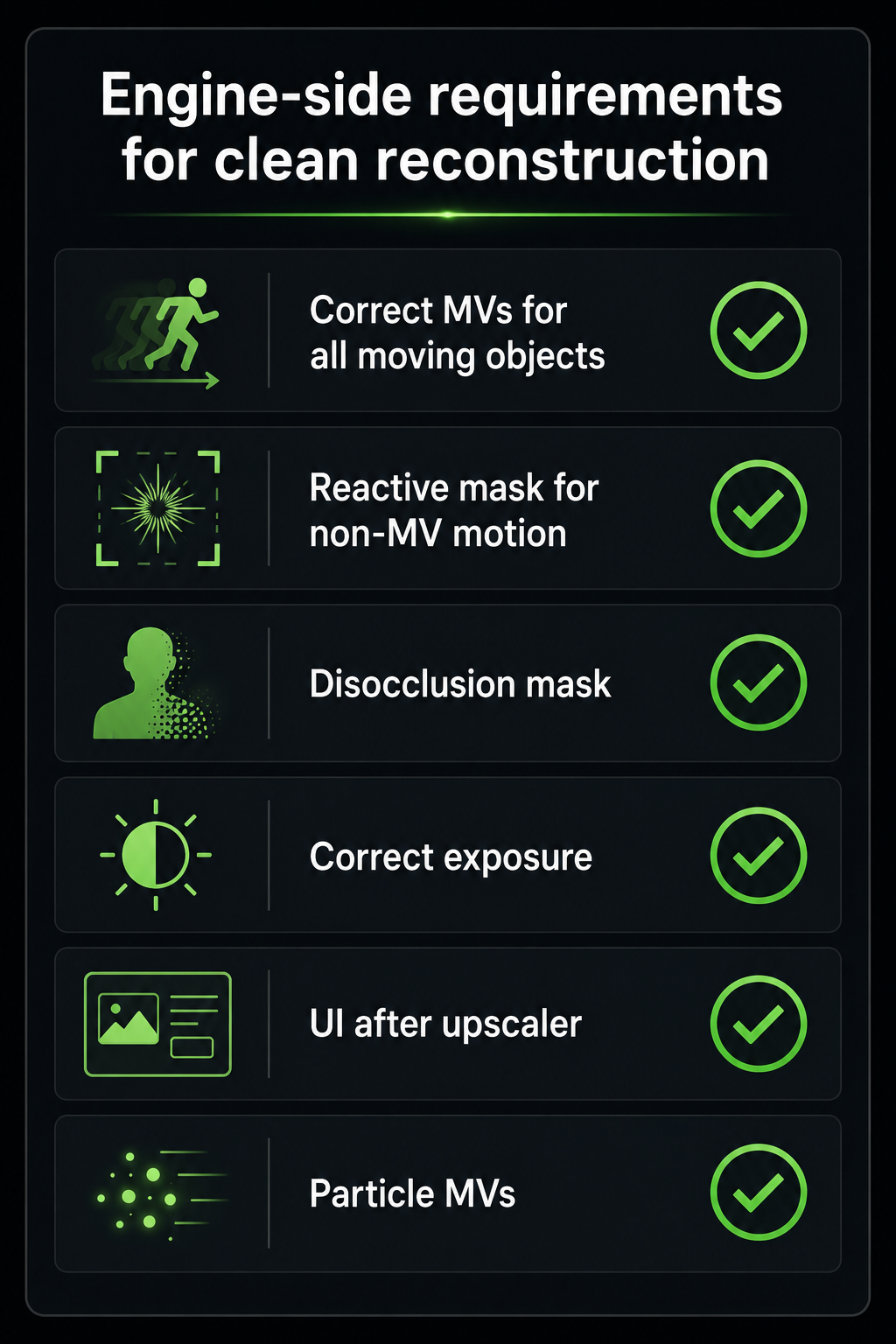
A surprisingly large amount of "DLSS quality" is really engine integration quality. The engine-side fixes that matter most:
- Correct motion vectors for everything, including particles, foliage sway, screen-space refraction, transparent objects.
- A reactive mask that flags pixels where the appearance change is not described by motion (e.g. fires, holograms, decals). The upscaler will treat history as less reliable there.
- A disocclusion mask if the engine can predict where pixels will be newly revealed (e.g. doors opening).
- Correct exposure value passed every frame DLSS internally maps to a perceptual space using this, and getting it wrong causes flicker.
- UI composited at output resolution after the upscaler, not before.
- Per-pixel auto-exposure smoothing, otherwise sudden exposure changes cause global flicker.
Games that get this right (e.g. Alan Wake 2, Cyberpunk post-patch, modern Unreal Engine 5.4+ titles) ship DLSS implementations that genuinely can look better than native. Games that don't (early launches with motion-vector bugs in vegetation or hair) ship with the artifacts everyone complains about.
Where this is going
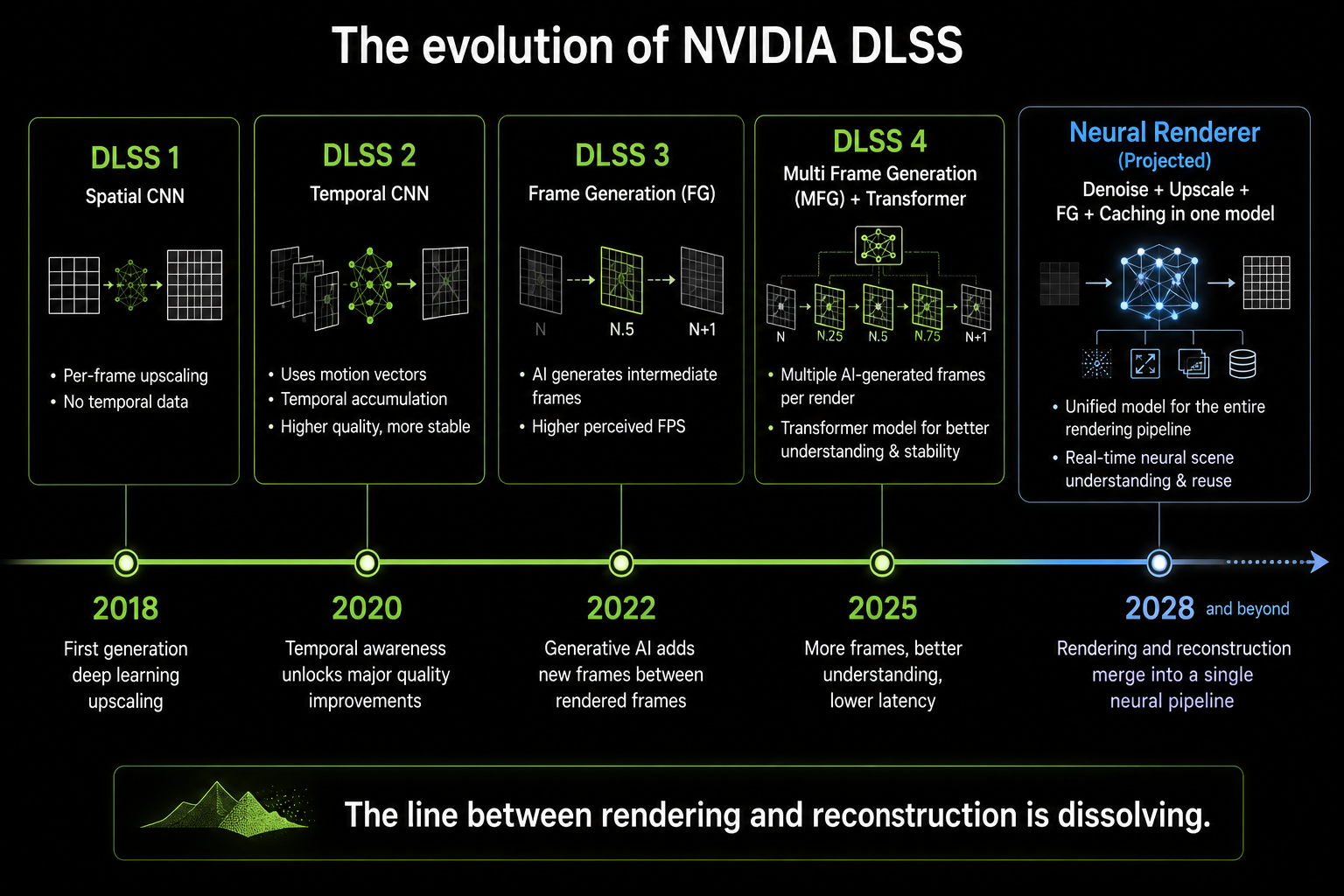
Reconstruction is not finished. Real trends to watch over 2026–2028:
1. Neural ray-tracing denoisers replacing classical denoisers
This is well underway: DLSS 3.5 Ray Reconstruction already replaces the engine's path-traced denoiser with a neural network. Future versions will integrate denoising, upscaling, and frame generation into a single multi-purpose model. The strict separation between "render" and "reconstruct" will soften.
2. Generated frames in latency-sensitive contexts
The reason FG is bad for competitive shooters is the added latency. If the network could extrapolate rather than interpolate predict frame N+1 from N and N-1 without waiting for N+1 to be rendered the latency penalty would disappear. Both NVIDIA and AMD have public research showing extrapolation is possible at the cost of more artifacts on fast motion. Expect "Reflex Frame Warp" or "Frame Warp 2" style techniques to emerge.
3. Cross-frame neural caching
Most of a frame's pixels don't change much frame to frame. If the engine could cache expensive intermediate results (e.g. global illumination at sparse probe locations) and let the network interpolate them, the per-frame cost of high-quality lighting could drop dramatically. NVIDIA's "Neural Radiance Cache" research and AMD's "Neural Supersampling" research both point this way.
4. Neural shaders
Replacing parts of the BRDF evaluation itself with a small neural network. Already showing up in research (NVIDIA's Neural Texture Compression, AMD's Neural Materials) and starting to appear in shipping games. The line between "rendering" and "ML inference" will blur further.
5. Convergence of console and PC reconstruction
The PS5 Pro proved consoles will get neural upscalers. The next Xbox is likely to ship with one. Apple's Game Mode in macOS is starting to expose MetalFX, which is converging on the same techniques. By the end of the decade essentially every game on every platform will be running through some form of neural reconstruction. Native rendering every pixel computed every frame will be a niche, possibly fully extinct.
A closing thought
Real-time graphics began by deciding that brute force was the way to draw the world: shoot a ray (or rasterize a triangle), compute a color, write a pixel, repeat eight million times per frame. For 30 years, every graphics advance came from doing more work, more cleverly, faster.
Frame generation is the moment that stopped working. We hit a wall. The interesting frontier moved from "compute more pixels accurately" to "compute fewer pixels and predict the rest from learned priors about what pixels look like". The whole industry pivoted. DLSS, FSR, XeSS, and PSSR are the same idea, implemented under different constraints, by different teams, on different silicon and they are not a temporary hack. They are the new substrate of real-time graphics.
If you understand temporal accumulation, motion vectors, neural reconstruction, and the interpolation vs extrapolation trade-off, you understand the foundation everything will be built on for the next decade. Welcome to the new pipeline.