
Where the GPU Spends Its Time
If you want to skip work, first you have to know where the work is.
Frame generation only makes sense if you understand which parts of a frame are expensive and which are cheap. The whole strategy of DLSS, FSR, XeSS, and PSSR is to skip the expensive parts and reconstruct what's missing. So this chapter is a detailed look at the cost structure of a modern frame.
A typical AAA frame breakdown
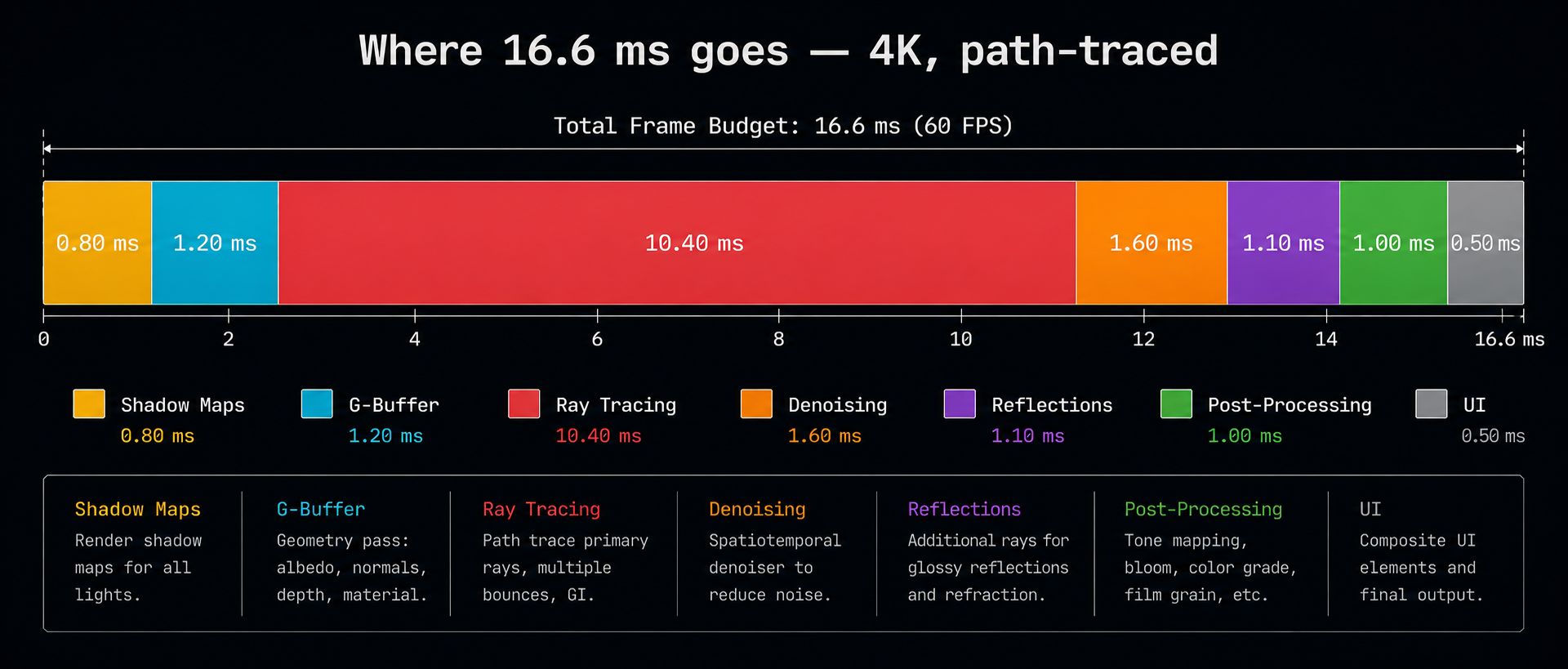
For a current-generation game like Cyberpunk 2077 with path tracing enabled, running at 4K on a high-end GPU, the per-frame timing roughly looks like this:
| Pass | Approx. time | Notes |
|---|---|---|
| Shadow maps | 1–2 ms | Re-render geometry from each light's view |
| G-buffer (geometry) | 2–4 ms | Vertex + fragment work, fills depth/normal/albedo |
| Ray traced lighting | 8–25 ms | The dominant cost in path-traced games |
| Denoising | 2–4 ms | Cleans up noisy ray-traced output |
| Reflections / SSR / SSAO | 1–3 ms | Screen-space approximations |
| Post-processing | 1–2 ms | Tonemapping, bloom, motion blur, DOF |
| UI / HUD | <1 ms | Cheap |
At native 4K with path tracing, the ray tracing and shading passes dominate everything else. That is why upscaling running those passes at, say, 1080p and reconstructing to 4K gives an enormous win. You are slashing the most expensive part of the frame by 4×.
The cost scales with pixel count
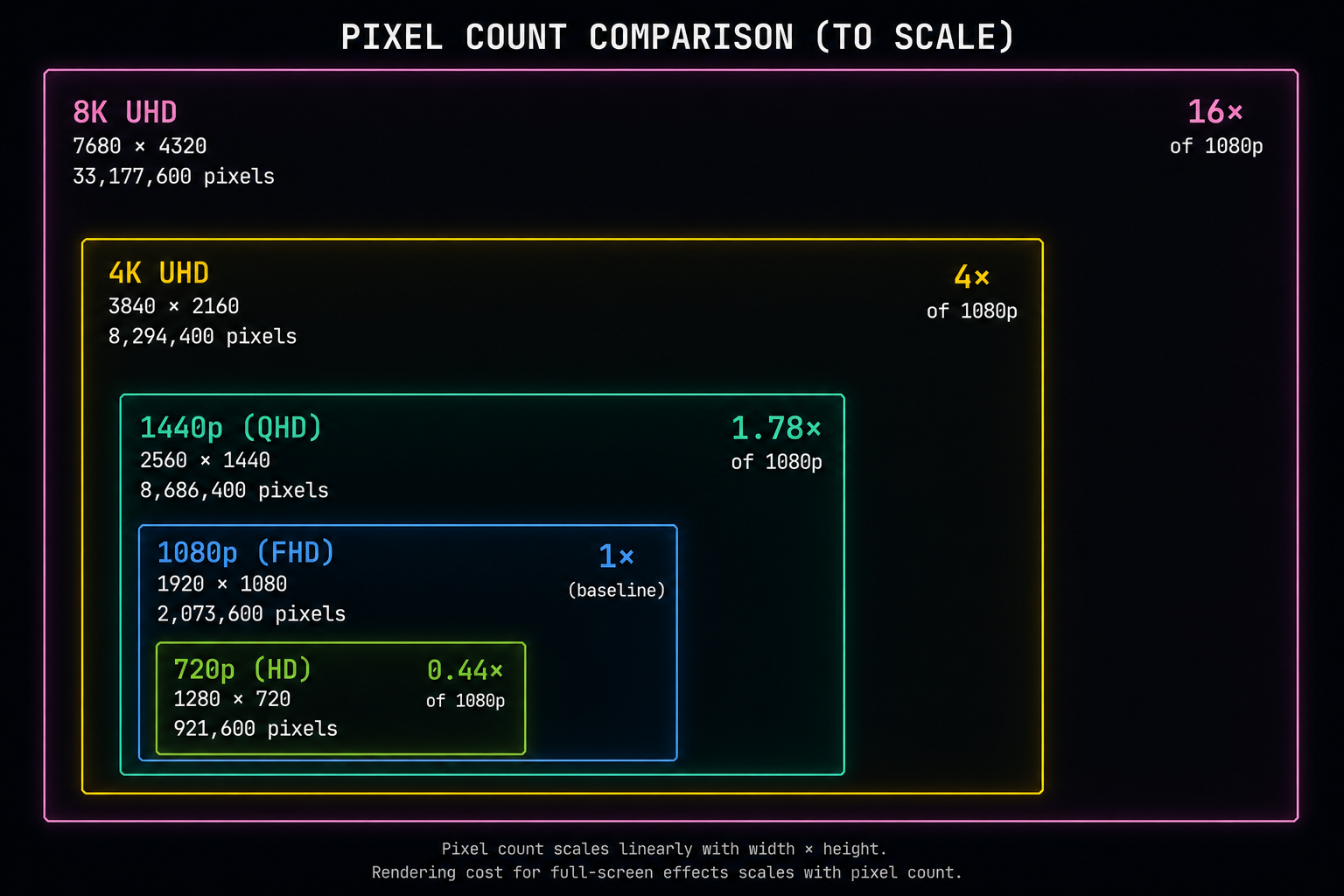
Almost every pass listed above scales linearly with the number of pixels. Double the resolution and you roughly double the cost and 4K is four times the pixels of 1080p. This is the central insight that upscaling exploits.
Going from 1080p to 4K means:
- 1920×1080 = 2,073,600 pixels
- 3840×2160 = 8,294,400 pixels
- 4× more pixels to shade, light, and trace rays for.
If your "Performance" DLSS mode internally renders at 1080p and outputs 4K, the engine is doing roughly a quarter of the per-pixel work of native 4K. The remaining cost reconstructing the missing pixels is performed by a small neural network that runs in a fraction of a millisecond on dedicated hardware.
Which passes scale with resolution, and which don't
This matters because frame generation is selective:
- Per-pixel passes (G-buffer, shading, ray tracing, post-processing) scale with resolution. Upscaling helps here.
- Per-vertex passes (vertex shaders, skinning, geometry processing) scale with triangle count, not pixel count. Upscaling does not help here.
- Setup and draw call overhead scale with the number of draw calls. Upscaling does not help here either.
- Memory bandwidth is shared by everyone and is often the real bottleneck on high-end GPUs.
This is why DLSS "Quality" mode (which internally renders at ~67% of output resolution) sometimes only gives you a ~20% performance gain in CPU-bound or geometry-bound games. The renderer wasn't actually limited by pixels.
Where ray tracing fits in
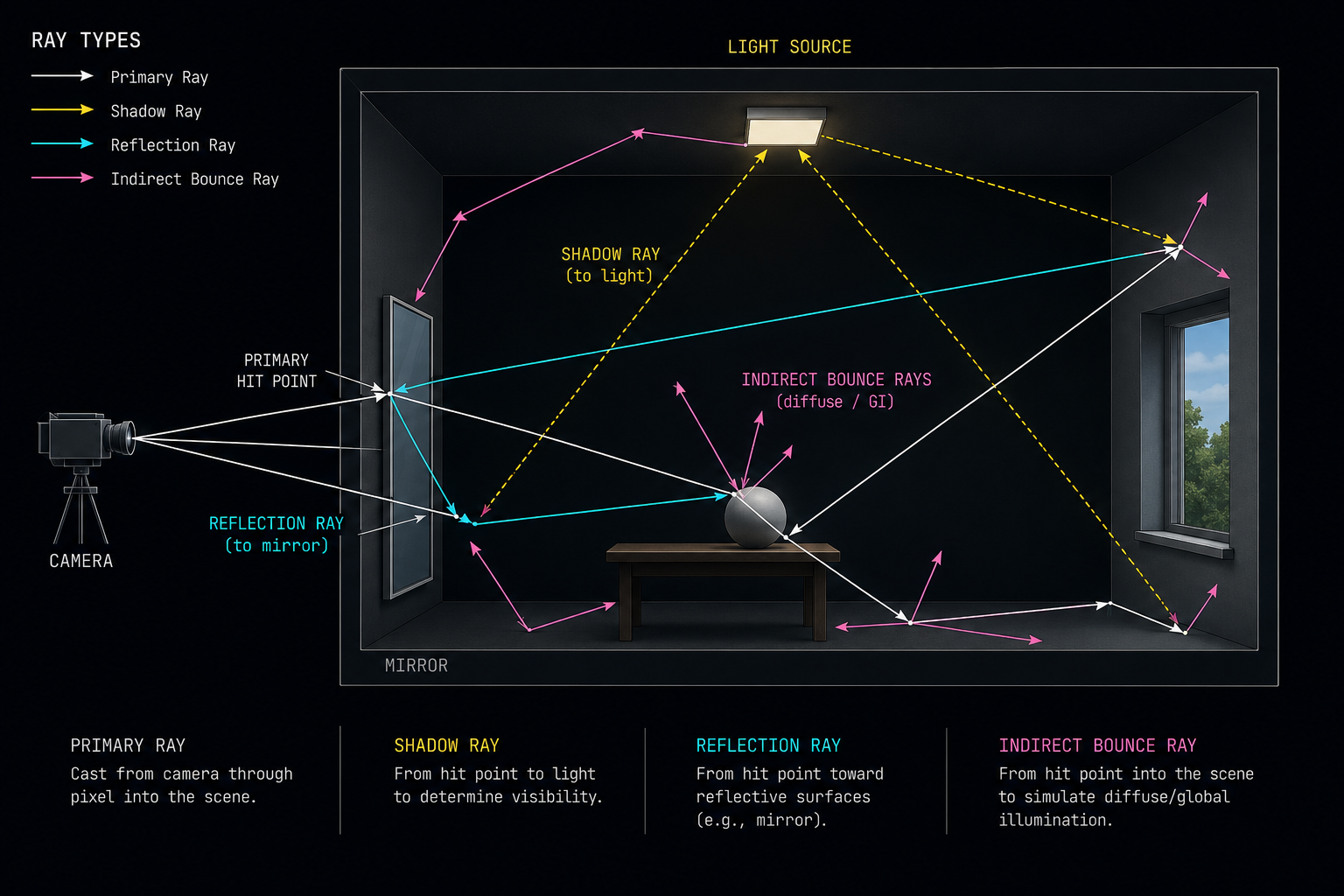
Hardware ray tracing made the pixel-cost problem dramatically worse. A single ray-traced "primary" hit can spawn 2–10 secondary rays for reflections, shadows, and global illumination. Each ray walks a BVH (bounding volume hierarchy) a tree of axis-aligned boxes looking for the first triangle it hits. Modern GPUs have a fixed-function RT core that accelerates BVH traversal and ray-triangle intersection.
Even with hardware acceleration, a path-traced game at 4K can fire hundreds of millions of rays per frame. The output is intensely noisy only one or two samples per pixel and must be cleaned up by a denoiser (often itself a small neural network or a hand-tuned spatio-temporal filter).
The shading cost is the real target
Add it all up and the picture is consistent: the most expensive thing a modern GPU does is evaluate per-pixel shading equations, especially when those equations involve ray tracing. Geometry, shadows, and post-processing are smaller costs. CPU work animation, physics, AI, draw call submission is essentially independent of resolution.
So if you want a magic switch that doubles or triples your frame rate, the place to look is the per-pixel shading cost. Upscaling attacks that cost by rendering fewer pixels in the first place. Frame generation attacks it differently: by rendering fewer entire frames and reconstructing the gaps.
In the next chapter we'll look at the technique that made both possible temporal anti-aliasing and how it taught engines to mix information across time.