
DLSS 3 Frame Generation: Inventing Frames
Optical flow + motion vectors + a neural network producing a frame that was never rendered.
Everything up to this point has been about reconstructing pixels from sparse samples. DLSS 3 Frame Generation does something fundamentally different: it reconstructs entire frames the renderer never drew. The output of a game running with Frame Generation at "240 FPS" actually has the renderer producing 120 real frames per second; the other 120 are interpolated by the GPU between them.
This is a more radical idea than upscaling, and it has more interesting failure modes. Let's look at exactly what happens.
The setup
DLSS 3 Frame Generation is built on top of DLSS Super Resolution. The pipeline looks like this each rendered frame:
- The engine renders frame N at internal resolution, with jitter, with motion vectors. Same as before.
- DLSS Super Resolution upscales frame N to output resolution. We have a real, high-res frame N.
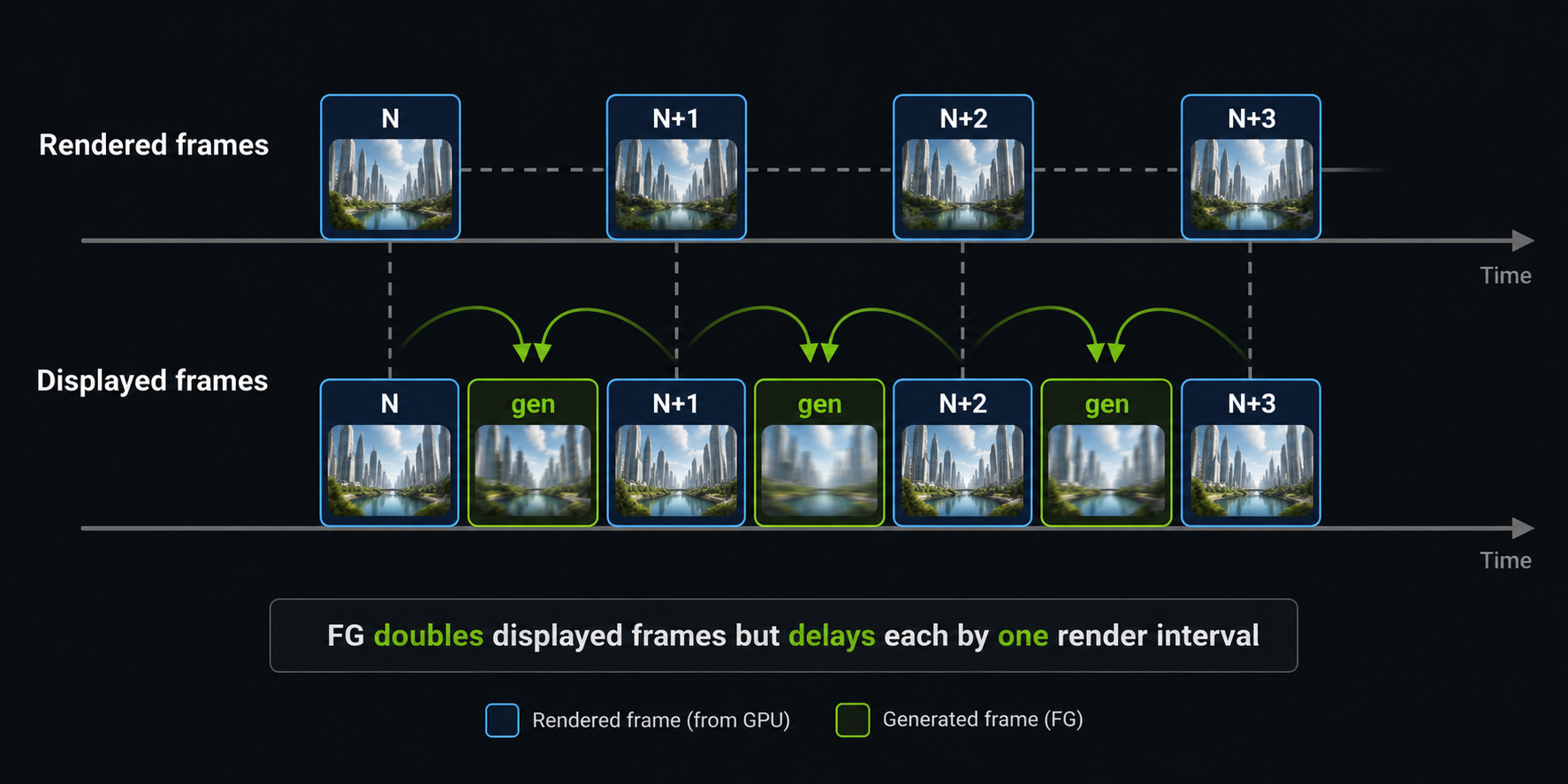
- Frame Generation holds frame N and frame N+1 (also rendered and upscaled), runs the optical flow accelerator on the pair, fuses with motion vectors, and synthesises a generated frame N.5 between them.
- The display sequence becomes: N → N.5 (generated) → N+1 → N+1.5 (generated) → N+2 → …
Notice this means Frame Generation always delays display by at least one rendered frame. To produce N.5 you need to already have N+1. The game cannot show N.5 before it has rendered N+1. We will come back to this latency cost in a later chapter, because it is the central trade-off of the whole technique.
The two motion sources
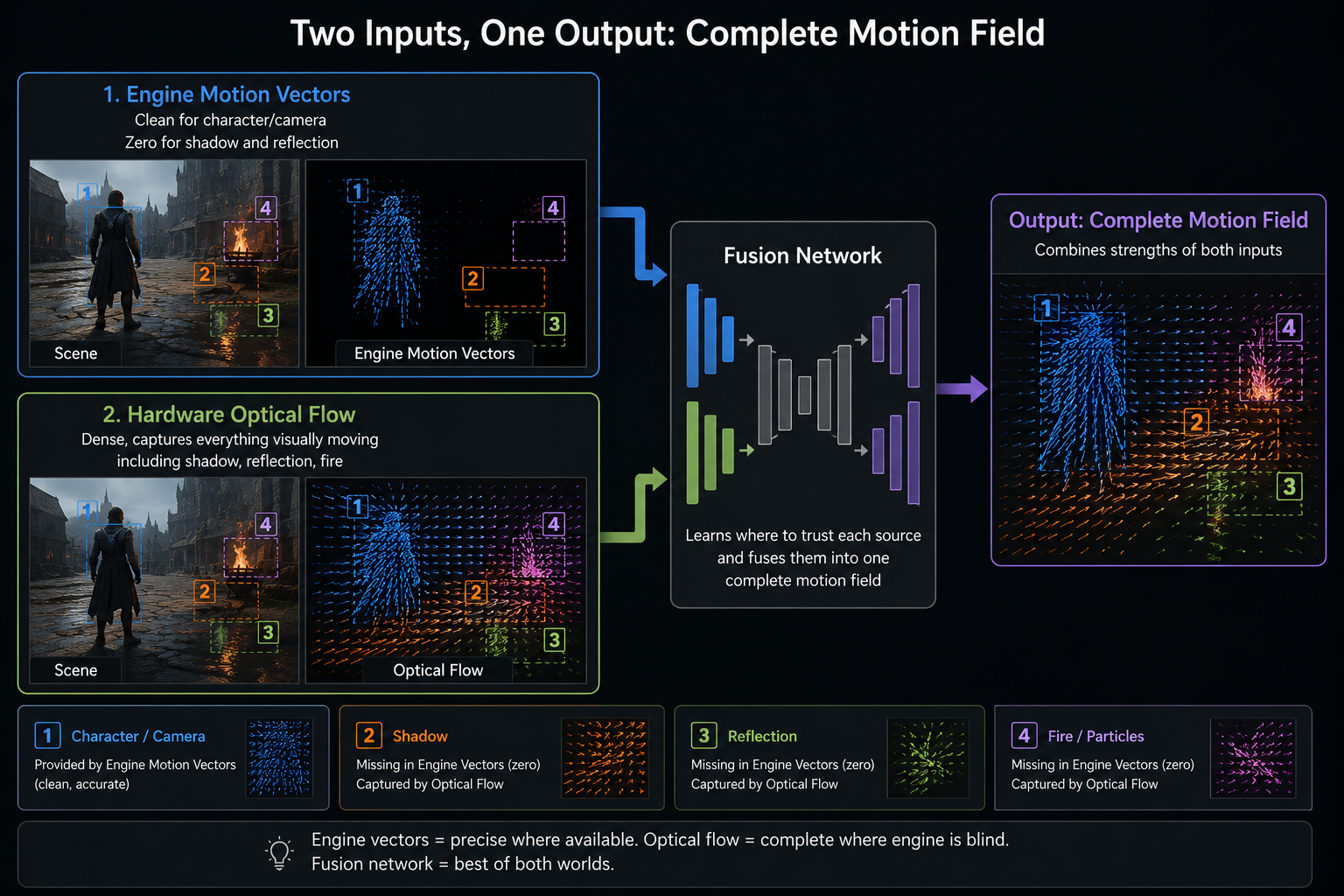
Producing the generated frame is, at heart, a motion-aware interpolation problem: given two frames and the motion between them, paint the in-between frame. DLSS 3 uses two sources of motion, fused:
Engine motion vectors
Same as Super Resolution. Accurate for camera and rigid-body motion. Blind to shadows, reflections, refraction, specular highlights, and (often) particles. These are the motion vectors that have always been there in modern engines.
Optical flow
A computer-vision technique that takes two images and computes, per pixel, the apparent motion between them just from the pixel values, without any knowledge of what is in the scene. Classical optical flow has been around since the 1980s (Horn–Schunck, Lucas–Kanade). Modern variants are deep-learning-based.
NVIDIA Ada and Blackwell GPUs have a fixed-function Optical Flow Accelerator (OFA) that produces a dense optical-flow field between two high-res frames in well under a millisecond. The OFA was not new to Ada Turing already had it but on Ada its precision and quality were dramatically increased specifically to make Frame Generation possible.
Why both, not one
Engine motion vectors are accurate but incomplete; optical flow is complete but ambiguous (uniform regions have no detectable flow; repetitive patterns confuse it; sub-pixel motion is noisy). Fusing them gives:
- Engine MVs where they're confident (rigid objects, camera).
- Optical flow where engine MVs are blind (shadows, reflections, specular, particles).
- A learned blending function that knows when each source is reliable.
Without optical flow, generated frames in path-traced games would have ghosted shadows behind every moving object a deal-breaker. With it, shadows generally move correctly even though no engine motion vector ever described them.
The interpolation network
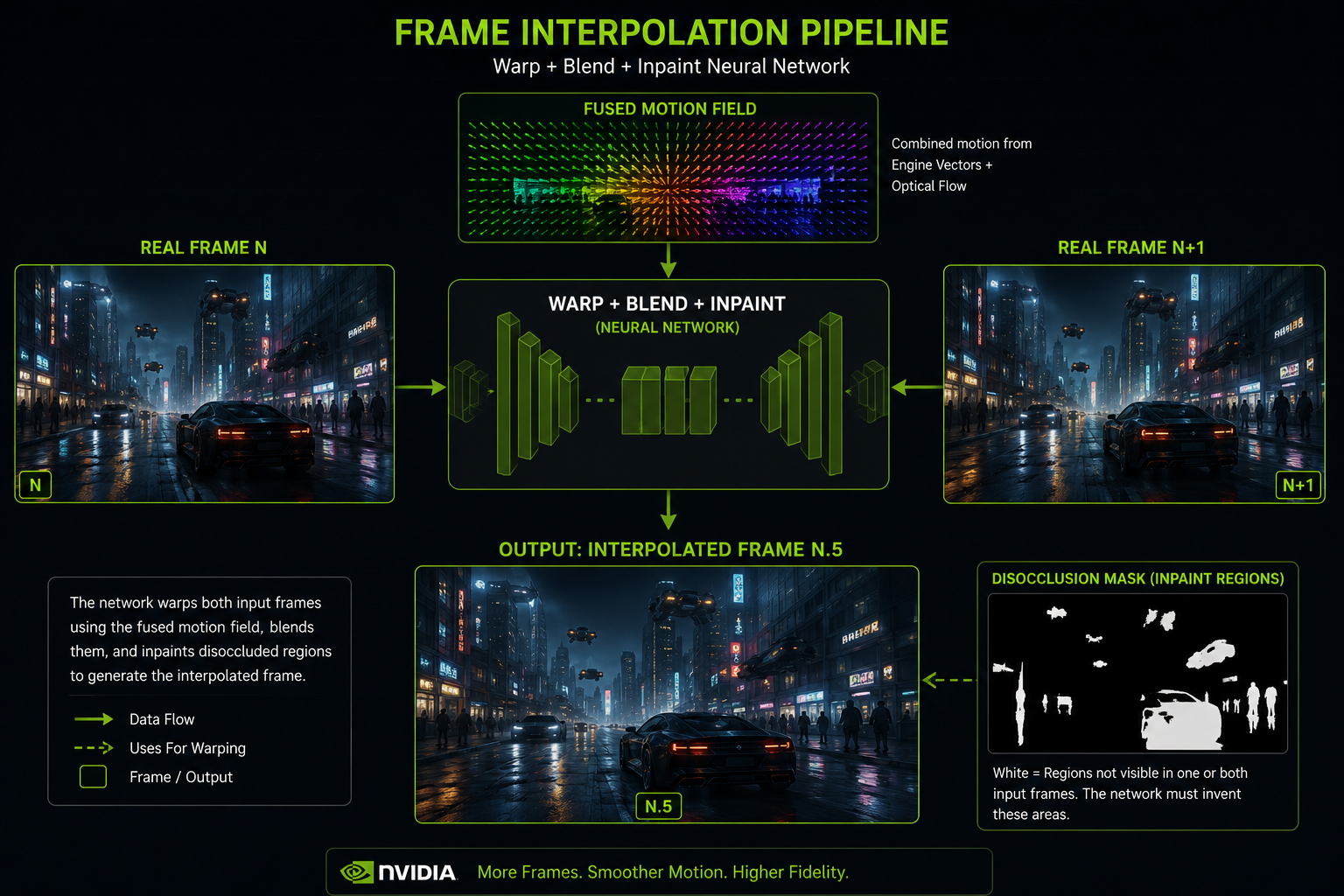
Once the fused motion field is available, a second neural network performs the actual frame synthesis. It takes:
- Frame N (high-res).
- Frame N+1 (high-res).
- The fused motion field.
- A confidence mask describing where the motion field is reliable.
- (Optional) extra signals: depth from N and N+1, the G-buffer.
And it produces frame N.5 by:
- Warping both N and N+1 toward the halfway point in time, using the motion field.
- Blending the two warped images, with the blend weights controlled by the confidence mask.
- Filling in disocclusion holes regions visible in only one of the two real frames but not the other using context from the visible side.
This is, in image-processing terms, motion-compensated frame interpolation a technique that has existed for decades in TV upscalers and codecs but with neural networks trained specifically on game content, and with engine-provided geometry data as additional input. That extra input is what makes it dramatically better than the cheap interpolation in your TV.
The UI problem
Game UI is rendered at the end of the frame and is static at the pixel level between frames a healthbar in the same screen position both at N and N+1. Engine motion vectors for UI are zero by definition.
So if you naively interpolate, the UI looks fine it just doesn't move. Good.
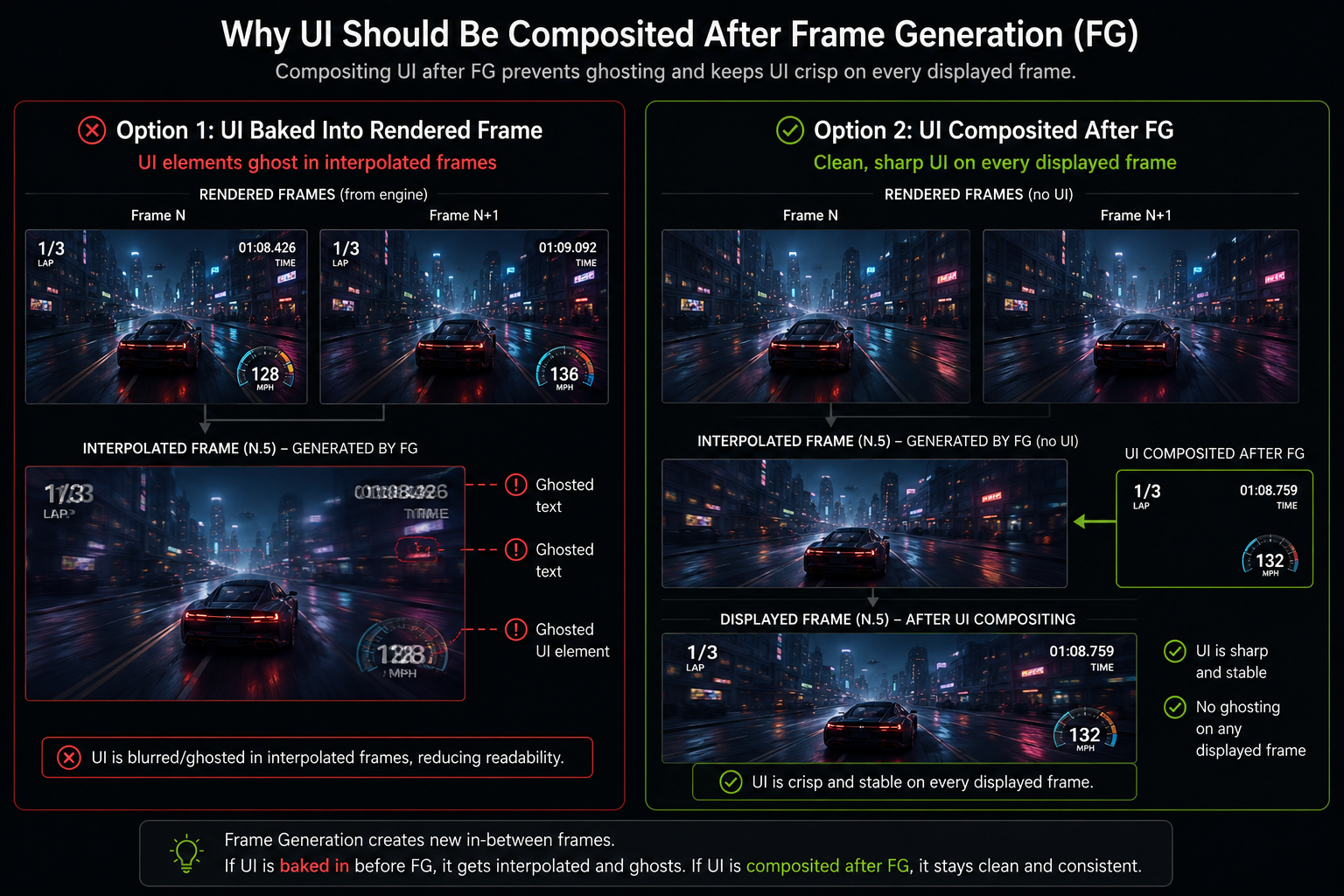
The problem is when the UI is animated (a numeric counter ticking, an animated reticle, a screen-shake effect). Then the engine MVs are zero but the pixel values change between frames. Optical flow catches some of this, but the result can still be visibly wrong: ghosted text, doubled HUD elements, smeared reticles.
This is why early DLSS 3 implementations had visibly broken UI in many games. The fix is either:
- Composite UI after Frame Generation. Render the world, generate frames, then draw the UI on every displayed frame. Now the UI is rendered at full FPS and never interpolated. This is the right answer, and the modern integration path.
- Tell DLSS which regions are UI via a mask, so the network can simply pass them through.
Why DLSS 3 needs Ada (and DLSS 4 doesn't)
DLSS 3 launched gated to GeForce RTX 40-series (Ada) and newer. NVIDIA's stated reason: only Ada's redesigned OFA was precise enough to produce convincing flow. Skeptics argued it was a marketing gate; people who tried to get it running on Turing/Ampere via hacks confirmed that the older OFA produced visibly worse optical flow, with smeared reflections and incorrect particle interpolation.
DLSS 4 changed the math. The new transformer-based Frame Generation model is less dependent on the hardware OFA and uses more learned components, so multi-frame generation became feasible on a wider hardware base though NVIDIA still gates the multi-frame variant to RTX 50-series Blackwell. That gate is harder to defend on pure-technical grounds.
What it costs
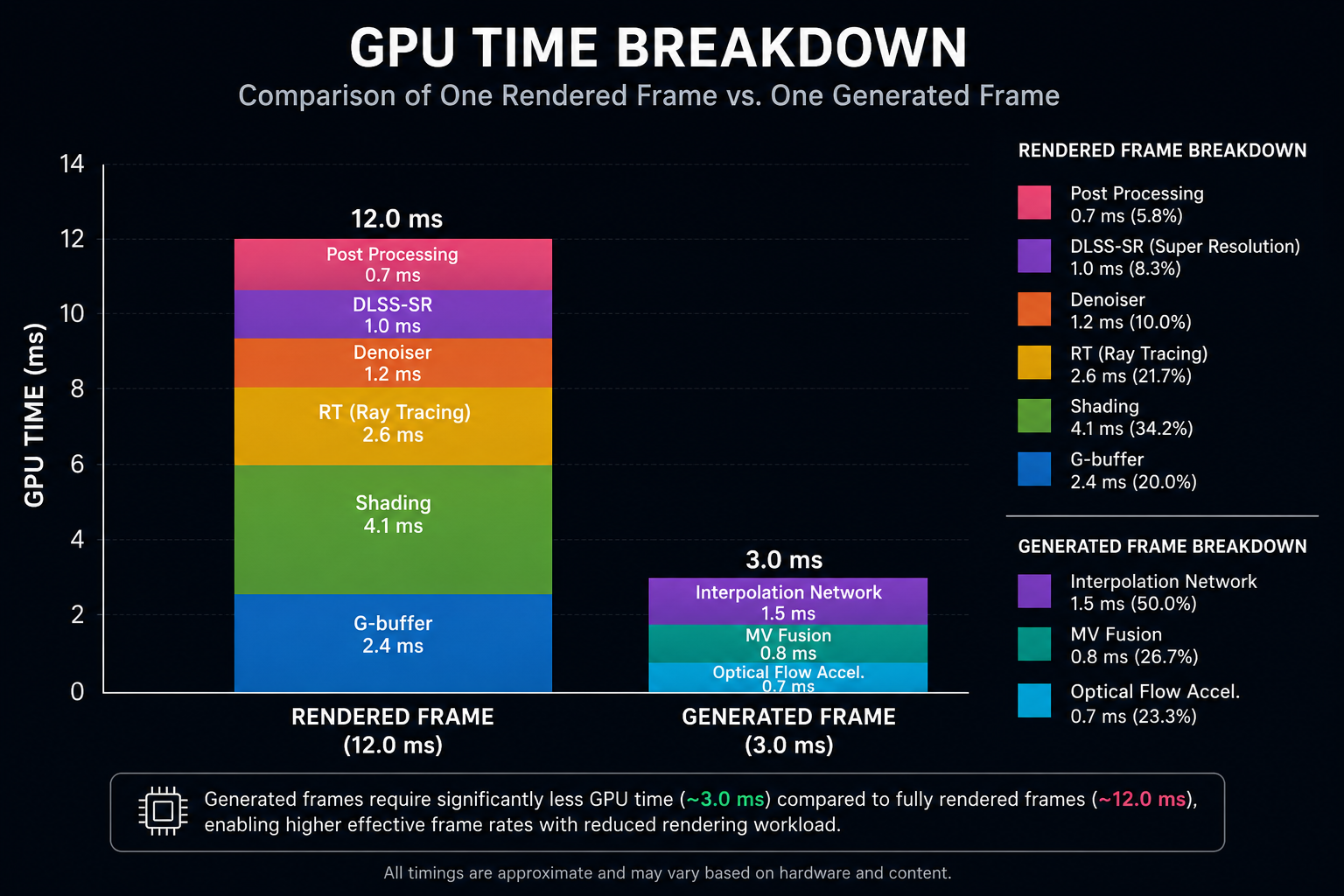
The Frame Generation pass OFA + interpolation network + motion vector fusion takes roughly 2–3 ms on an RTX 4090 at 4K. Add the DLSS Super Resolution cost (~1 ms) and you have a per-frame DLSS overhead of about 3–4 ms.
That sounds small. But: because Frame Generation displays the interpolated frame between two rendered frames, you only "buy back" the cost if the rendered frame rate is high enough that the extra display frames are worth their latency cost. On the practical side, FG starts to feel awful below about 40 rendered FPS, smooth around 60+, and excellent above 80. We will look at why in the latency chapter.
Next: how DLSS 4 took this idea to its logical conclusion generating three frames between each pair of real ones.