
DLSS Super Resolution: The Real Mechanics
Not magic. Convolutional networks, jitter, motion vectors, and Tensor Cores.
DLSS is Deep Learning Super Sampling. The "Super Sampling" name is honest: it is doing temporal super-sampling, in spirit identical to TAAU, with a neural network replacing the hand-tuned reconstruction heuristics. This chapter walks through what the algorithm actually does at runtime.
Generations, briefly
DLSS has had four major revisions:
- DLSS 1.0 (2018, Battlefield V, Metro Exodus). A purely spatial CNN trained per-game. It worked at 1440p→4K but looked blurry and was unloved. NVIDIA quietly abandoned this approach.
- DLSS 2.0 (2020). The temporal rewrite. Took TAAU's structure and replaced the heuristics with a single generic CNN trained across all games. This is the version that made the technology famous.
- DLSS 3.5 (2023). Added the Ray Reconstruction path for path-traced games, which replaces the engine's separate ray-tracing denoiser with a network that denoises and upscales in one step. Same Super Resolution model underneath.
- DLSS 4 (2024–2025). Replaced the CNN with a vision transformer. Significantly better thin-feature reconstruction and lower ghosting; slightly higher cost. Backward-compatible old games can opt in by swapping the DLL.
When we say "DLSS" without qualification in the rest of this course, we mean DLSS 2 onwards. The DLSS 1 approach is dead.
What the engine has to give DLSS
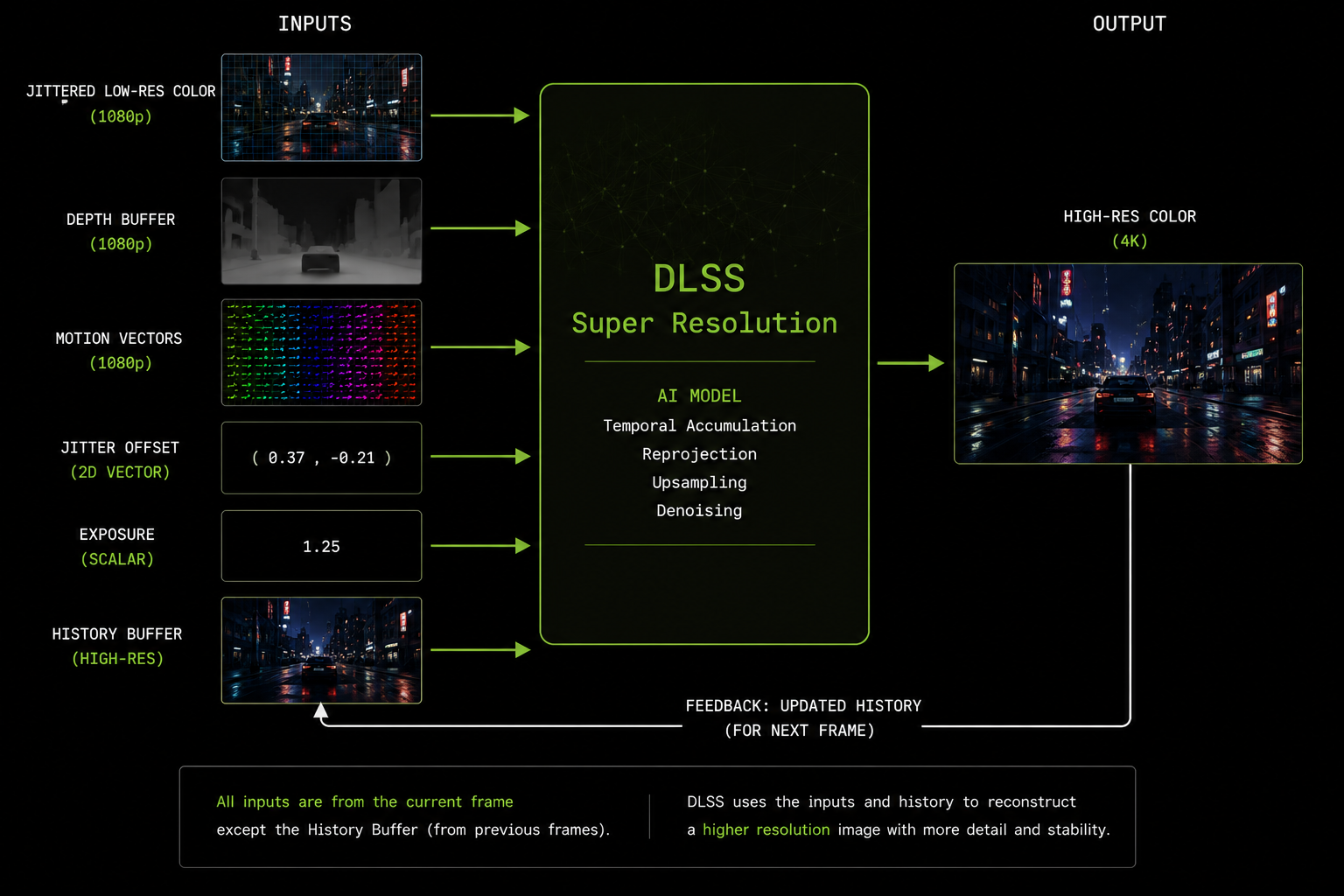
DLSS is not a black box you wire to the framebuffer. It is a library (an NVIDIA NGX .dll / .so) that the engine calls with specific inputs:
| Input | What it is |
|---|---|
| Low-res color | The freshly rasterized current frame, at internal resolution (e.g. 1080p), with jitter applied to the projection matrix |
| Depth | The depth buffer from the same frame |
| Motion vectors | Per-pixel motion, at the same resolution as color, in pixel units |
| Jitter offset | The current frame's sub-pixel jitter, in (x, y) |
| Exposure | The current frame's exposure value (for tonemapping awareness) |
| (Optional) Bias / sharpness | Tuning parameters |
| History | The previous DLSS output (DLSS manages this internally) |
If any of these are wrong, DLSS will produce visible artifacts. Wrong motion vectors → ghosting. No jitter → no anti-aliasing. Wrong depth scaling → disocclusion errors. Tonemapped color when DLSS expects linear (or vice versa) → flicker. Most DLSS bugs in shipped games are engine-side, not network-side.
Quality presets and internal resolutions
DLSS exposes scaling presets that map to fixed internal-resolution ratios:
| Preset | Internal scale | Example (4K out) |
|---|---|---|
| DLAA | 100% | 3840×2160 in → 3840×2160 out |
| Quality | 67% | 2560×1440 in → 3840×2160 out |
| Balanced | 58% | 2227×1253 in → 3840×2160 out |
| Performance | 50% | 1920×1080 in → 3840×2160 out |
| Ultra Performance | 33% | 1280×720 in → 3840×2160 out |
The network is the same for all presets. Only the ratio of input-to-output pixels changes. More-aggressive presets ask the network to invent more, so artifacts get more visible, but the underlying math is identical.
What the network actually does
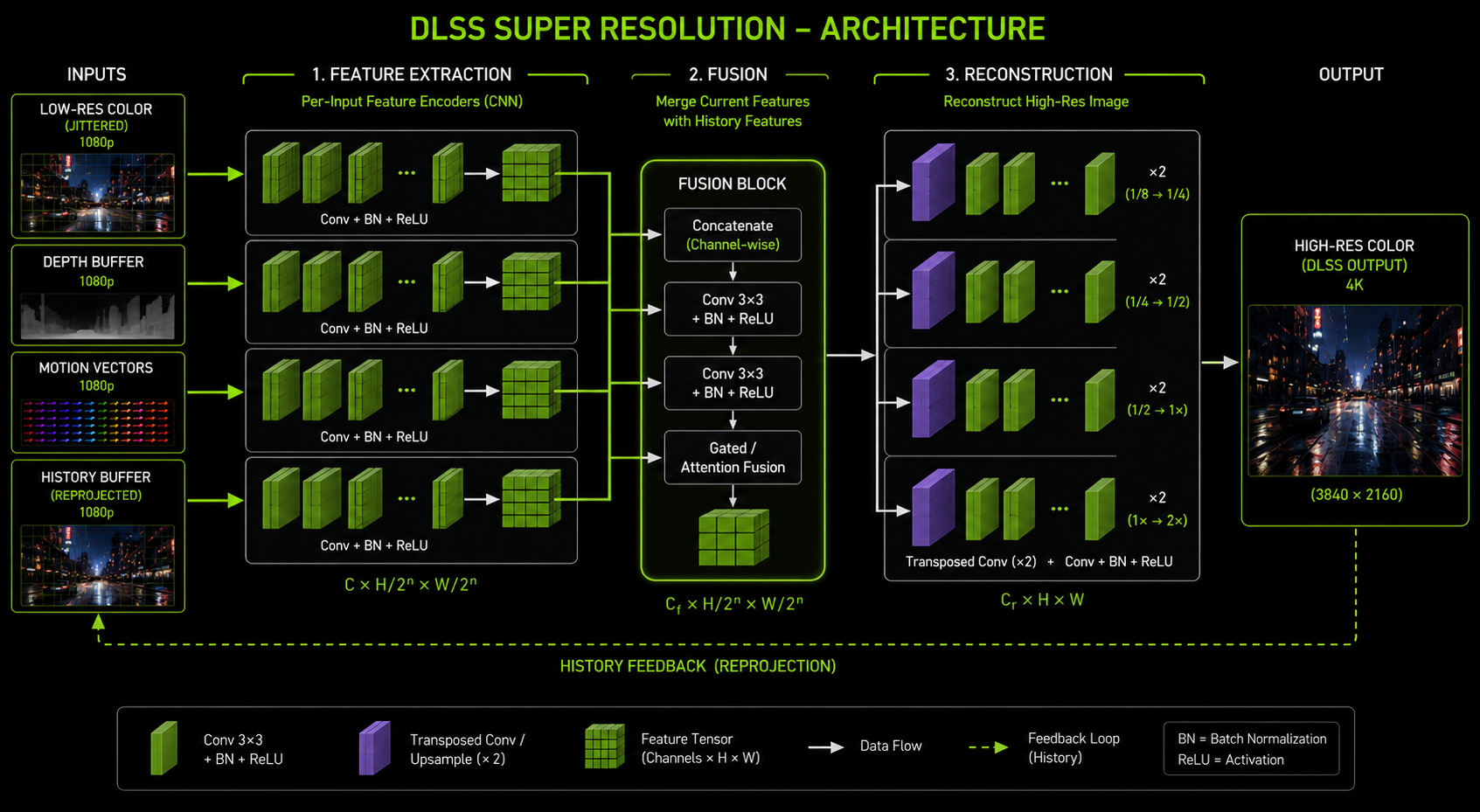
Inside, DLSS is a relatively small CNN (Super Resolution model) or transformer (DLSS 4). Public-domain reverse engineering and NVIDIA's own GDC presentations suggest the structure is approximately:
- Pre-processing: tonemap the input color so the network sees a perceptually uniform space, undo the jitter offset (sample the texture as if it were un-jittered), pack inputs into a single tensor.
- Feature extraction: a few convolutional layers extract local features from the current-frame color/depth/motion data.
- History sampling: the previous-frame output is sampled at the reprojected positions using the motion vectors. Already at output (high) resolution.
- Fusion: the current-frame features and the reprojected history features are fused concatenated and run through a small fusion sub-network. This is where the network decides, per pixel, how much to trust history.
- Reconstruction: a decoder path upsamples the fused features to the output resolution and produces the high-res color.
- Post-processing: untonemap to put the output back into the engine's pre-tonemap space, so the engine can apply its own tonemap + bloom + film grain on top.
In the transformer version (DLSS 4) the conv stages are replaced by attention blocks operating on image patches, which is better at modeling long-range relationships useful for thin features (a 1-pixel wire that spans the screen).
How it is trained
NVIDIA trains DLSS offline on a supercomputer using:
- Inputs: low-resolution frames captured from many real games, with the same per-frame data the engine would provide at runtime (color, depth, motion, jitter, exposure).
- Targets: matching high-resolution frames rendered at 16× super-sampling that is, the engine rendered each pixel of the target image as the average of 16 jittered samples. These are the "ground truth" the network is asked to reproduce.
- Loss function: a combination of pixel-space L1, a perceptual loss (VGG features), and a temporal consistency loss that penalises flicker between consecutive output frames.
The training data is curated to include all the cases that humans found hard to handle fast motion, thin features, foliage, particle effects, transparent surfaces so the network spends extra capacity on them.
This is why DLSS sometimes looks better than native: the ground truth it was trained against has more samples per pixel than any real-time renderer can afford. A native 4K image with 1 sample per pixel has aliasing. The DLSS 4K output is approximating a 16-sample-per-pixel image. So in regions where it succeeds, it really is sharper than native + TAA.
What the network does not do
DLSS is a 2D image reconstruction network. It does not understand 3D geometry, materials, lighting, or scene semantics. It does not run a small renderer inside itself. Common misconceptions to debunk:
- DLSS does not ray-trace. (That is Ray Reconstruction, a separate network in DLSS 3.5+.)
- DLSS does not know what a face, a car, or a fence is only what shapes tend to recur in the training distribution.
- DLSS does not ask the engine to re-render anything. It is strictly a post-process.
- DLSS does not see your textures at full resolution only the rendered low-res output. Texture detail comes from the engine's normal mipmap selection.
Where it goes wrong
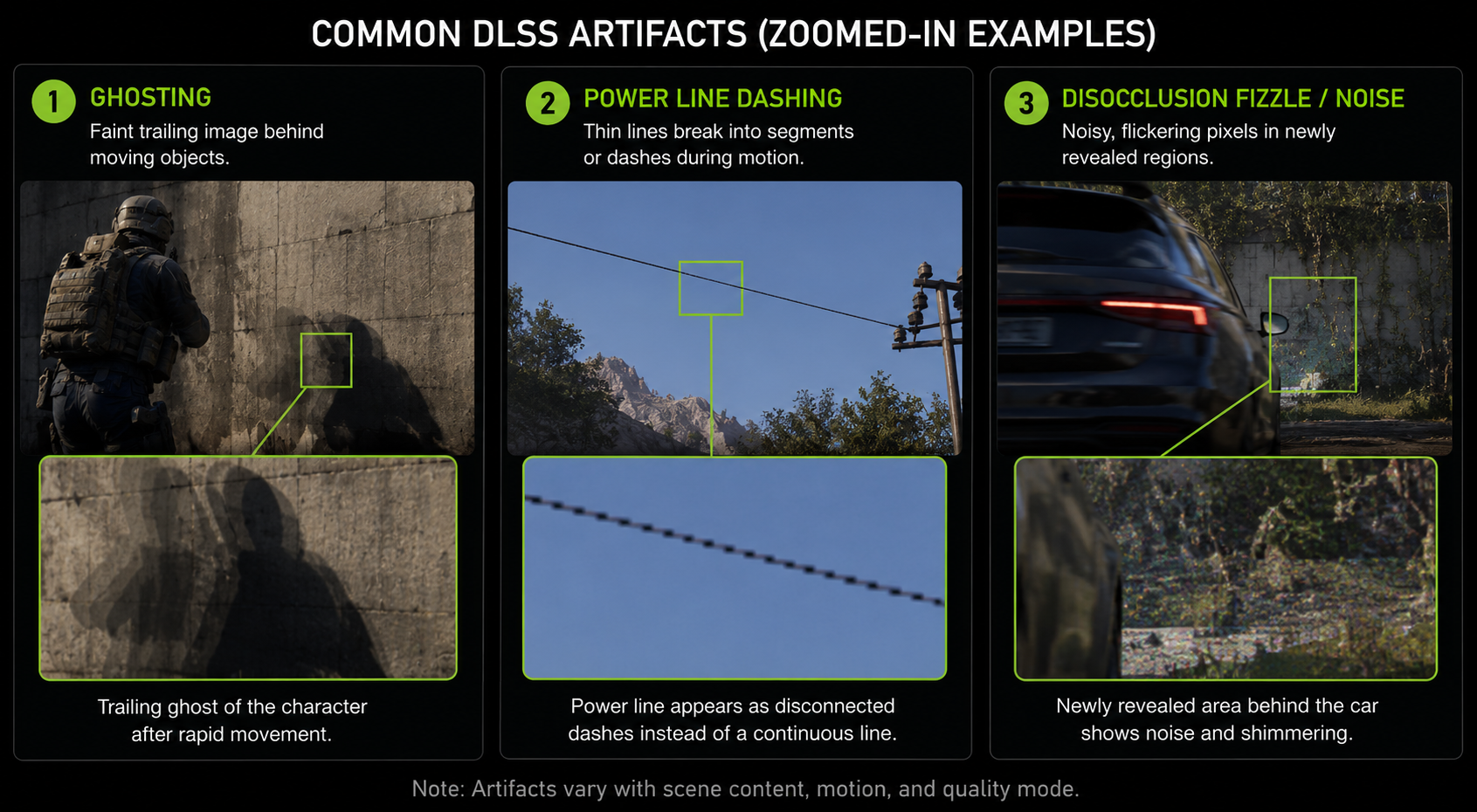
Three artifact families dominate user complaints:
- Ghosting: a moving object leaves a faint trail. Cause: history not invalidated when it should be usually because the motion vector under the trail is wrong (it points at the static background instead of the moving object, or vice versa).
- Thin-feature breakup: power lines, antennae, hair flicker or vanish. Cause: at lower internal resolutions, the feature is sub-pixel for too many frames to accumulate; the network gives up rather than hallucinate.
- Disocclusion fizzle: when something gets uncovered (camera moves past a pillar) the newly visible region looks noisy for a few frames until the network has enough samples. This is fundamental and unavoidable.
Why DLSS is locked to NVIDIA hardware
The network only runs efficiently on Tensor Cores. Without them, the matrix math falls back to general-purpose shader cores and the cost balloons to 5–10 ms per frame, which would defeat the purpose. AMD GPUs do not have Tensor Cores; Intel's Arc GPUs have XMX units that are conceptually similar but software-incompatible. This is the (real, technical) reason DLSS is NVIDIA-only and the reason FSR 2/3 and XeSS exist as alternatives, which we will look at in chapter 10.
In the next chapter we look at the sibling that almost no one talks about: DLAA, which is the same network configured to do anti-aliasing without upscaling.