
Upscaling: Spatial, Temporal, and Neural
Why bilinear is doomed, why TAAU works, and why neural reconstruction won.
Before we look at DLSS specifically, we need to understand what kind of problem upscaling is and what kinds of solutions are possible. There are three generations of approach, and modern upscalers are a hybrid of all three.
Spatial upscaling: the dead end
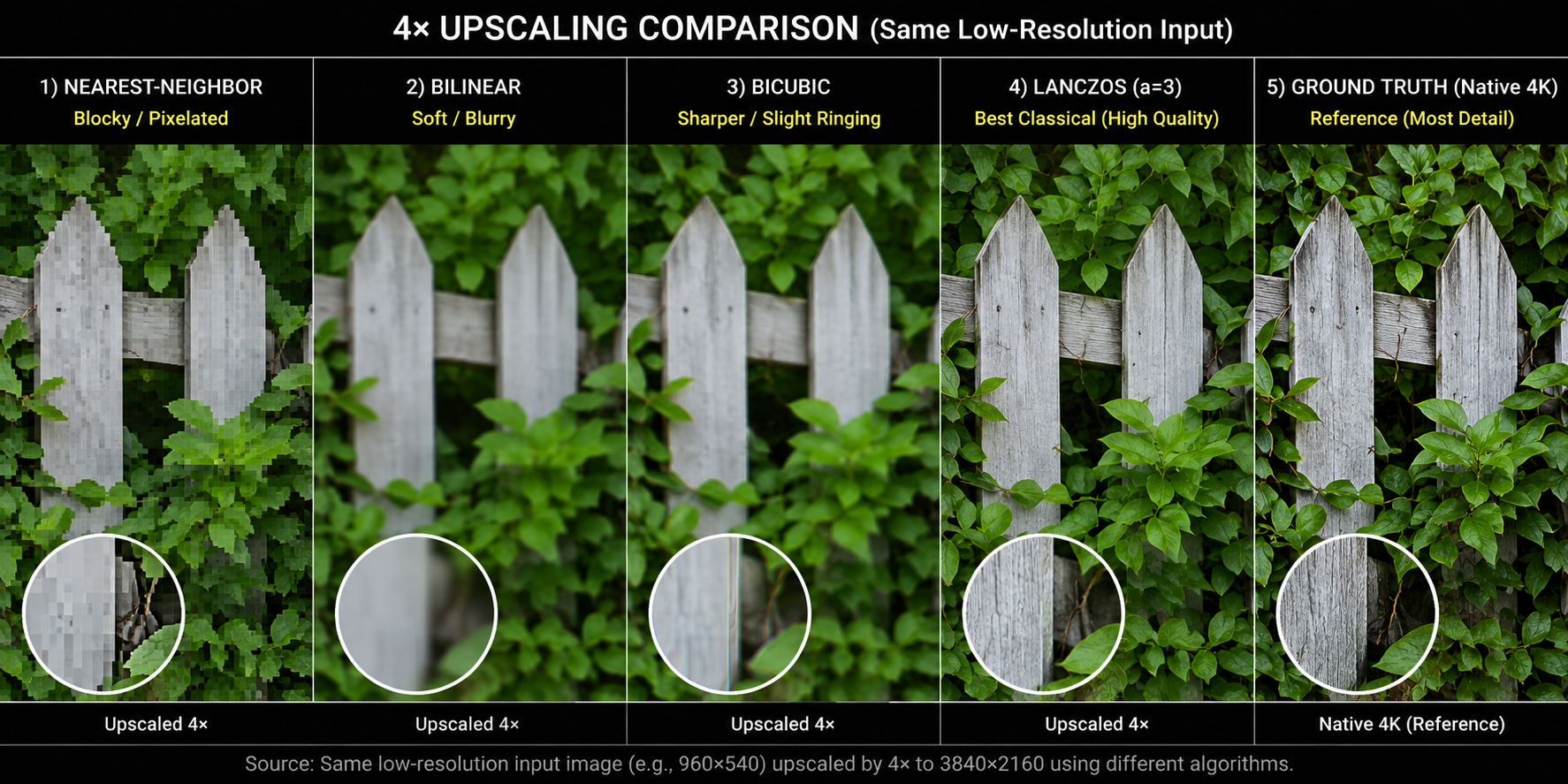
The dumbest possible upscaler reads each output pixel and asks: "what input pixel(s) does this correspond to, and how should I interpolate between them?"
The classical answers are:
- Nearest-neighbor: pick the closest input pixel. Pixelated, blocky.
- Bilinear: weighted average of the 4 nearest input pixels. Smooth but blurry.
- Bicubic: weighted average of 16 nearest pixels using a cubic kernel. Sharper than bilinear, ringing artifacts on sharp edges.
- Lanczos: sinc-windowed bicubic. The classical gold standard.
All of these share a fatal property: they invent no new information. They can only smooth out what's already there. If you upscale a 1080p frame to 4K with Lanczos, you get a 4K image that has exactly 1080p of detail in it. Edges look fine. Anything sub-pixel fine geometry, distant foliage, text is permanently lost.
FSR 1: spatial-only and what it tells us
AMD's FSR 1 (2021) is the most polished spatial-only upscaler. It uses a custom edge-adaptive Lanczos-like kernel plus a sharpening pass (RCAS). The result is impressive for what it is a single-frame algorithm with no history but it cannot recover sub-pixel detail and cannot anti-alias. FSR 1 is essentially obsolete now; AMD itself replaced it with FSR 2 (temporal) and FSR 3 (temporal + frame generation).
The lesson: you cannot upscale convincingly from a single frame. You have to bring in information from somewhere else. That "somewhere else" is time.
Temporal upscaling: where the magic starts
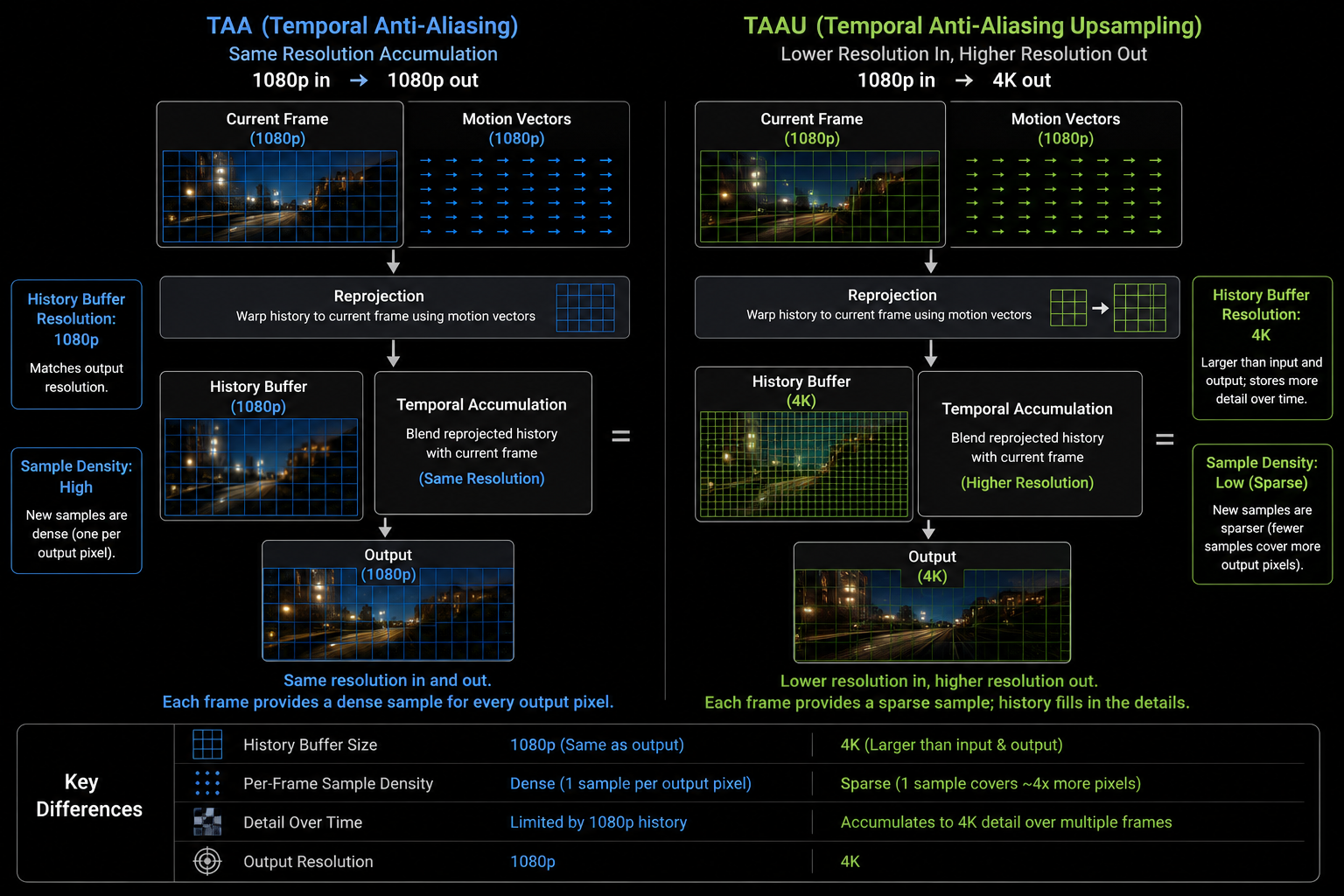
Recall from the TAA chapter: if you jitter the projection matrix sub-pixel-by-sub-pixel across many frames, the samples cover the pixel area densely over time. Now reuse that same idea, but make the output resolution higher than the input:
Each frame, render at 1080p with a jittered camera. Each frame, accumulate that 1080p sample into a 4K history buffer. After 8–16 frames, every 4K pixel has been hit by at least one well-placed low-res sample, and the 4K image has actual 4K detail in it.
This is TAAU. Done right, it produces output that looks indistinguishable from native 4K in most regions, and noticeably better in regions where anti-aliasing matters (foliage, hair, distant geometry).
                       jitter offsets
                            ↓
   Render @ 1080p ───► Sample positions distributed across 4K pixel grid
                            ↓
   Reproject + accumulate into 4K history
                            ↓
   Resolve → final 4K image
The two failure modes from TAA become worse under TAAU, because the algorithm is taking many fewer samples per output pixel per frame:
- Disocclusion holes are now ~4× more visible.
- Ghosting trails are longer because each new sample is a smaller fraction of the result.
- Thin features (wires, fences, hair) that move can flicker because there aren't enough samples per output pixel.
Unreal Engine's TSR (Temporal Super Resolution, introduced in UE5) is a state-of-the-art hand-tuned TAAU. It works well, but it has rough edges, particularly in fast motion and on particle effects. It is, importantly, not AI it is just very careful classical heuristics.
Neural upscaling: the third leap
The hand-tuned heuristics in TAAU color clamping, depth rejection, velocity-based history weighting are limited. They are written by humans, on a deadline, trying to balance ghosting against shimmer against softness. A neural network can learn a much better function.
The shape of the function:
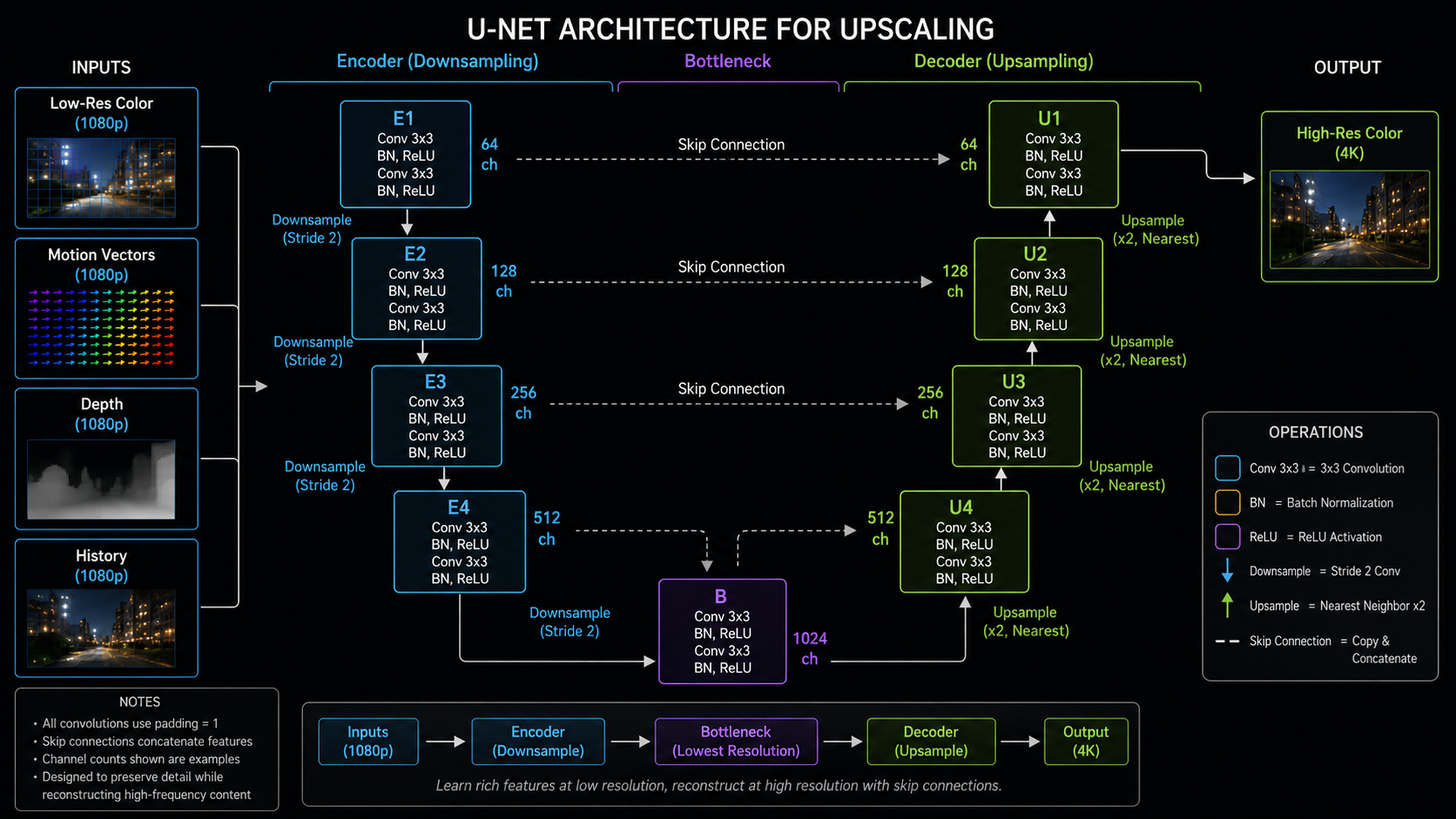
- Input: low-res color (jittered), motion vectors, depth, previous output (the history), and often extra signals like the previous-frame motion vectors, exposure, and a per-pixel disocclusion mask.
- Output: a high-res color image.
- Network: a small convolutional neural network, typically a U-Net-like encoder-decoder with a few million parameters. Recent versions (DLSS 3.5 / 4) replace the CNN with a vision transformer.
- Training data: millions of pairs of (low-res game frame + signals, high-res ground truth rendered at 16× super-sampling).
The network learns, implicitly, all the things that hand-written TAAU tried to do:
- When to reject history (a learned disocclusion classifier).
- How to recover sub-pixel detail (a learned upsampling kernel that adapts to local geometry).
- How to smooth shimmer without erasing detail (a learned spatial regularizer).
- How to handle thin features that hand-tuned TAAU drops.
It also picks up things that no hand-written algorithm easily can: it learns what kinds of structures games tend to contain (hair, fences, foliage, brick patterns, text) and reconstructs them more aggressively than a content-agnostic filter would dare.
Why "AI" really does matter here
It is fashionable to be skeptical of AI marketing. In this case the skepticism is misplaced. The reason DLSS works as well as it does is that the neural network is solving a problem knowing when the heuristics are wrong that hand-written code is bad at. A pixel might be on a thin wire, in a reflection, behind a glass pane, in the disoccluded region behind a moving foreground object; each case wants a different history weighting. A network with enough capacity learns all of them implicitly from data.
The flip side is that all neural upscalers are sensitive to inputs they weren't trained on. Particle effects, screen-space refraction, post-processed bloom, sub-pixel UI elements anything outside the training distribution can produce surprising artifacts.
The cost of the network
This is the part people don't talk about. The neural network is not free:
- DLSS Super Resolution (CNN, 2020–2023) runs in roughly 0.5–1.5 ms on a high-end RTX 30/40 GPU.
- DLSS Super Resolution (Transformer, 2024+) runs in roughly 1.0–2.5 ms.
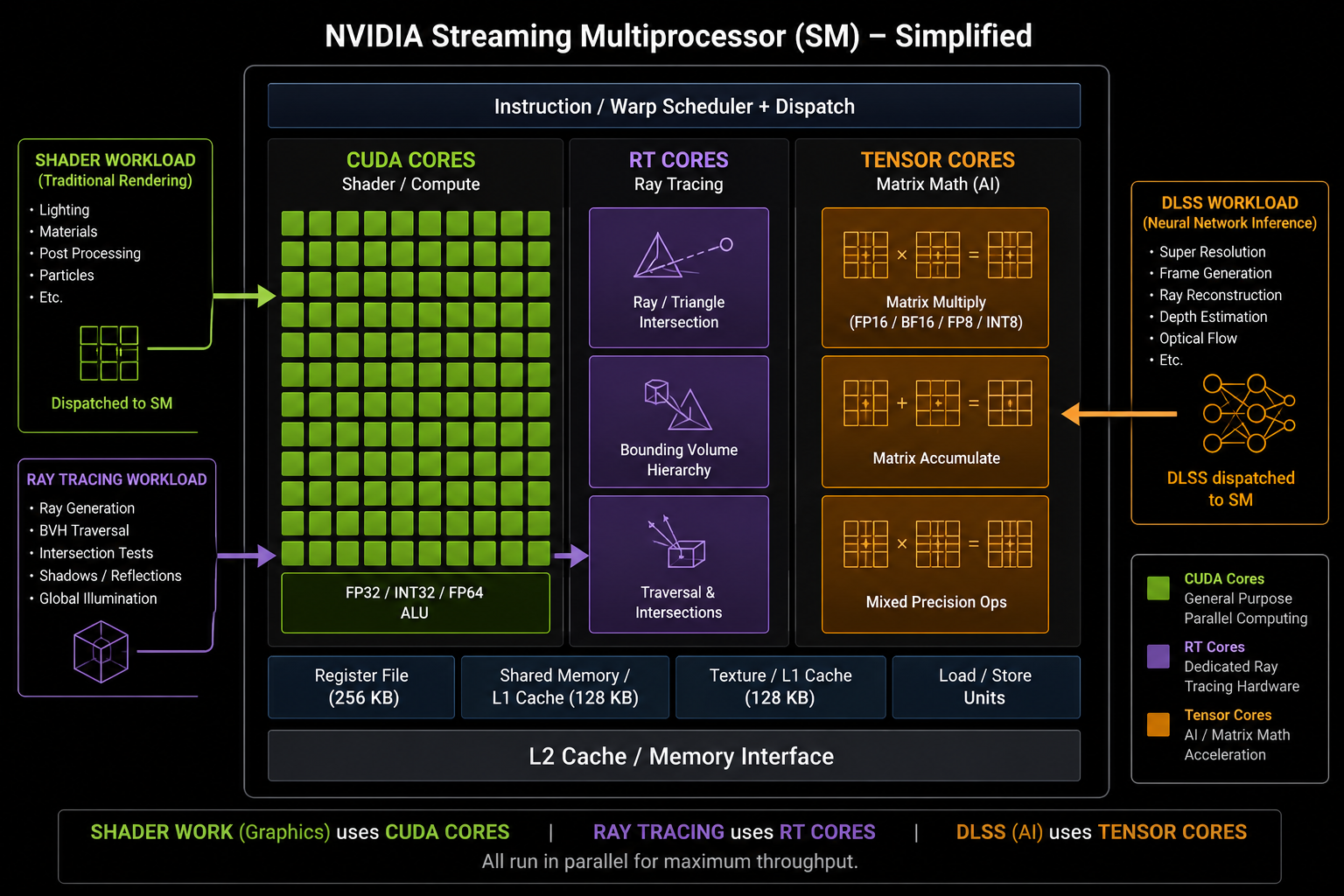
- It runs almost entirely on the Tensor Cores fixed-function matrix-multiplication units inside the SM which means it does not contend with the shader cores doing the rest of the frame work.
So in theory the cost is hidden. In practice, on lower-end GPUs with fewer or older Tensor Cores, the network cost can eat a meaningful slice of the frame budget, which is why DLSS gives smaller speedups on, say, an RTX 4060 than on a 4090.
With the foundation in place pipeline, TAA, motion vectors, neural reconstruction we can finally look at DLSS itself in detail. That is the next chapter.