
Temporal Anti-Aliasing: The Idea That Changed Everything
Before DLSS could reconstruct frames, TAA taught engines to remember them.
DLSS, FSR, XeSS, and PSSR are all, at their core, temporal algorithms. They don't reconstruct an image from a single frame; they accumulate information across many frames. The technique they descend from is Temporal Anti-Aliasing (TAA), and it is the single most important rendering technique of the last decade. If you understand TAA, the rest of the course is downhill.
The aliasing problem, revisited
In the crash course we saw that a pixel is either "inside the triangle" or "outside the triangle" at its center sample. That binary decision produces jagged edges (geometric aliasing), shimmering on small features (specular aliasing), and crawling on thin lines (subpixel aliasing).
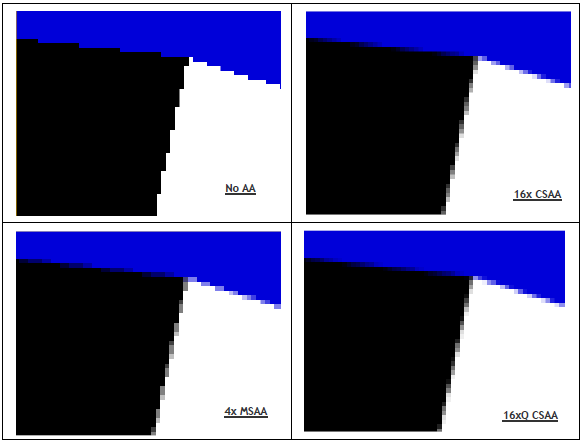
Classical anti-aliasing approaches all try to take more samples per pixel within a single frame:
- SSAA (super-sampling): render at 2× or 4× resolution, downsample. Beautiful, brutally expensive.
- MSAA (multi-sample): rasterize geometry edges at multiple sub-pixel positions, shade only once. Fast for forward rendering, but breaks under deferred shading, which is why MSAA died around 2014.
- FXAA / SMAA: cheap edge-detection blurs applied as a post-process. Look soft, don't fix shimmer.
By the time deferred rendering and PBR became standard, the industry was stuck. MSAA was incompatible with the rendering architecture; SSAA was too expensive; FXAA was a band-aid. Something else had to give.
The temporal trick
The insight behind TAA: a pixel doesn't have to take its samples all at once. It can take one sample this frame, a slightly different one the next, another the frame after, and average them over time. As long as the camera and the scene don't move too fast, the result converges toward what an expensive SSAA pass would produce but spread across many cheap frames.
This is done with two ingredients:
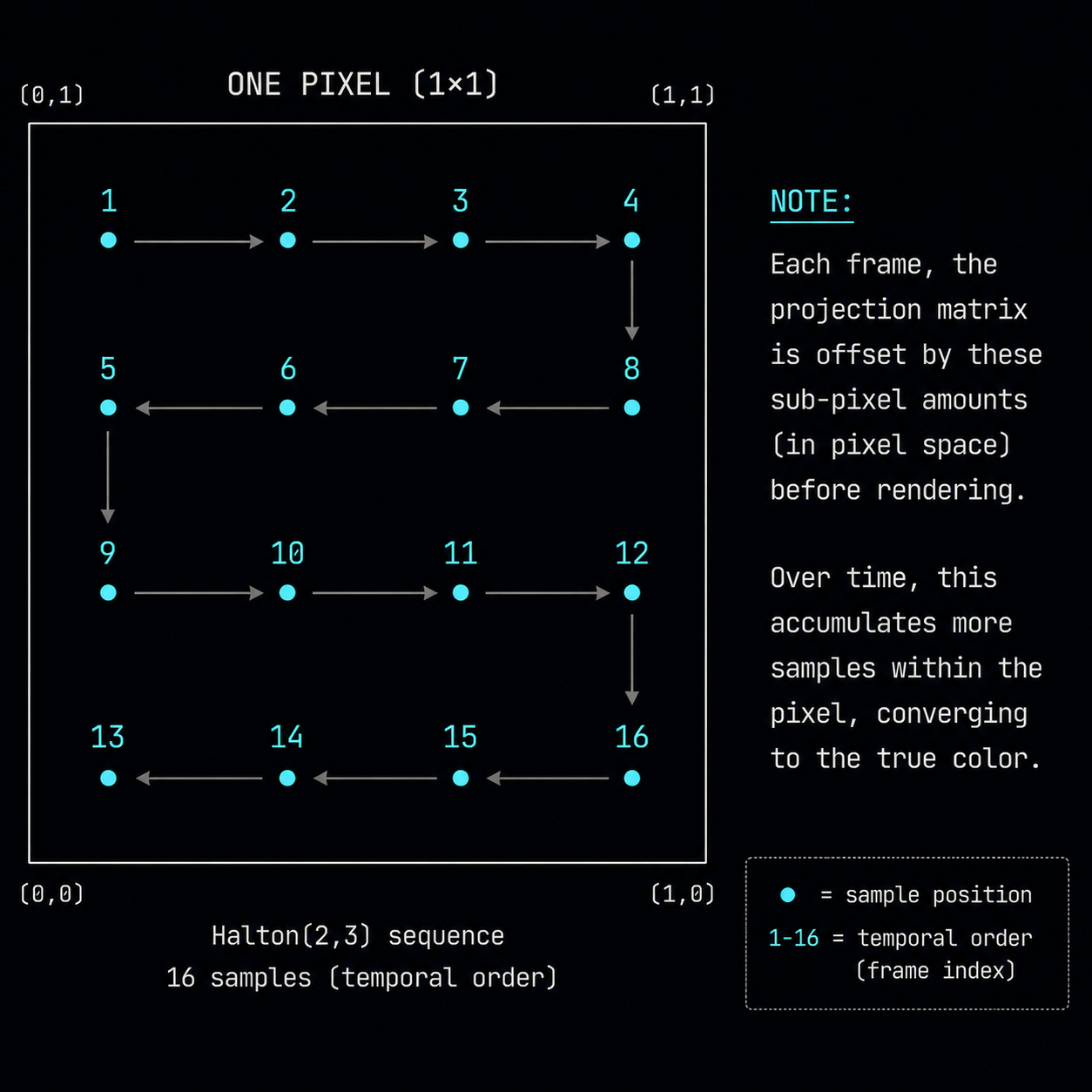
- Jittered sampling. Each frame, the projection matrix is offset by a tiny sub-pixel amount, so the "center" of every pixel falls at a slightly different position within the pixel. Over 8–16 frames, the sample positions cover the pixel area like a low-discrepancy lattice.
- History reprojection. To average across frames you need to know where each pixel was in the previous frame. For that you use motion vectors: a per-pixel vector that says "this pixel was at position (x', y') last frame".
The jitter pattern is almost always a Halton sequence a deterministic low-discrepancy sequence that fills the unit square more evenly than random numbers ever could. A common choice is Halton(2, 3) with 8 or 16 unique offsets per cycle.
The TAA algorithm, in pseudocode
// For every pixel of this new frame:
vec4 current = sample_current_frame(uv);                  // freshly rasterized
vec2 mv = sample_motion_vector(uv);                       // points to where this pixel WAS
vec4 history = sample_previous_frame(uv - mv);            // reproject the history

vec4 blended = mix(history, current, 0.1);                // 10% new, 90% old
write(blended);
That ~10% blend factor is the heart of it. Every frame, the pixel keeps 90% of what it had and adds 10% of the new (jittered) sample. After ~20 frames the contributions sum to the equivalent of a 20-sample super-sampled pixel. Anti-aliasing for almost free if you can trust the history.
The two failure modes
You cannot blindly trust history. Two things can ruin it:
- The pixel didn't exist last frame. A new triangle appeared (something walked out from behind a wall), or the camera turned and revealed a new part of the world. This is disocclusion. The history is wrong; using it produces ghosting trails.
- The pixel existed but looked different. A light turned on, a moving object changed orientation, a specular highlight moved across the surface. Using stale history produces smearing.
Real TAA spends most of its complexity handling these two cases. The standard tools are:
- Velocity rejection: if the motion vector magnitude exceeds a threshold, weight history lower.
- Depth rejection: if the depth at the reprojected position is wildly different from the current depth, the geometry under that pixel is different reject.
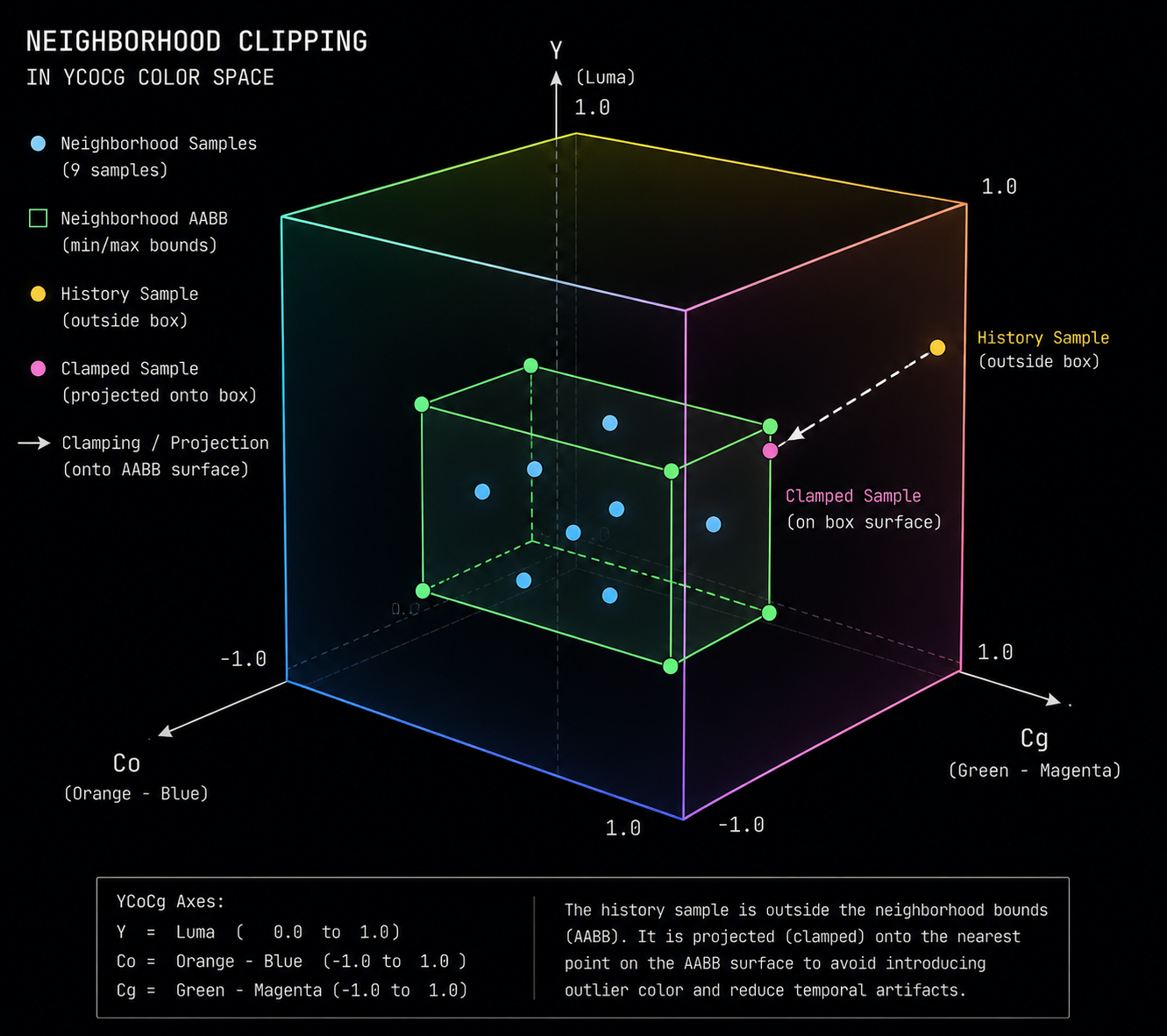
- Color clamping (neighborhood clipping): look at the 3×3 neighborhood of the current frame, find the min/max color values, and clamp the history sample inside that box in YCoCg color space. If history disagrees with the local neighborhood, push it toward the neighborhood. This single trick kills most ghosting and is in every modern TAA implementation.
Why TAA looks soft
TAA's reputation for being "blurry" comes from three sources:
- The blend itself. Mixing old and new pixels low-pass filters detail. Sharp 1-pixel features get smeared across the blend.
- Reprojection error. Motion vectors are not perfect they don't include shadow movement, refraction, or sub-pixel jitter so the history is sampled from a slightly wrong location and bilinearly filtered, which softens.
- Aggressive history rejection. When TAA is conservative, it throws away valid history and falls back to a single jittered sample, which then breaks anti-aliasing.
Most modern TAA implementations apply a sharpening pass on top to compensate. Unreal Engine 4's TAA, Unreal 5's TSR, and CryEngine's TAA all have a sharpening filter built in.
TAA upscaling: where DLSS came from
Here is the punchline that makes the rest of this course possible:
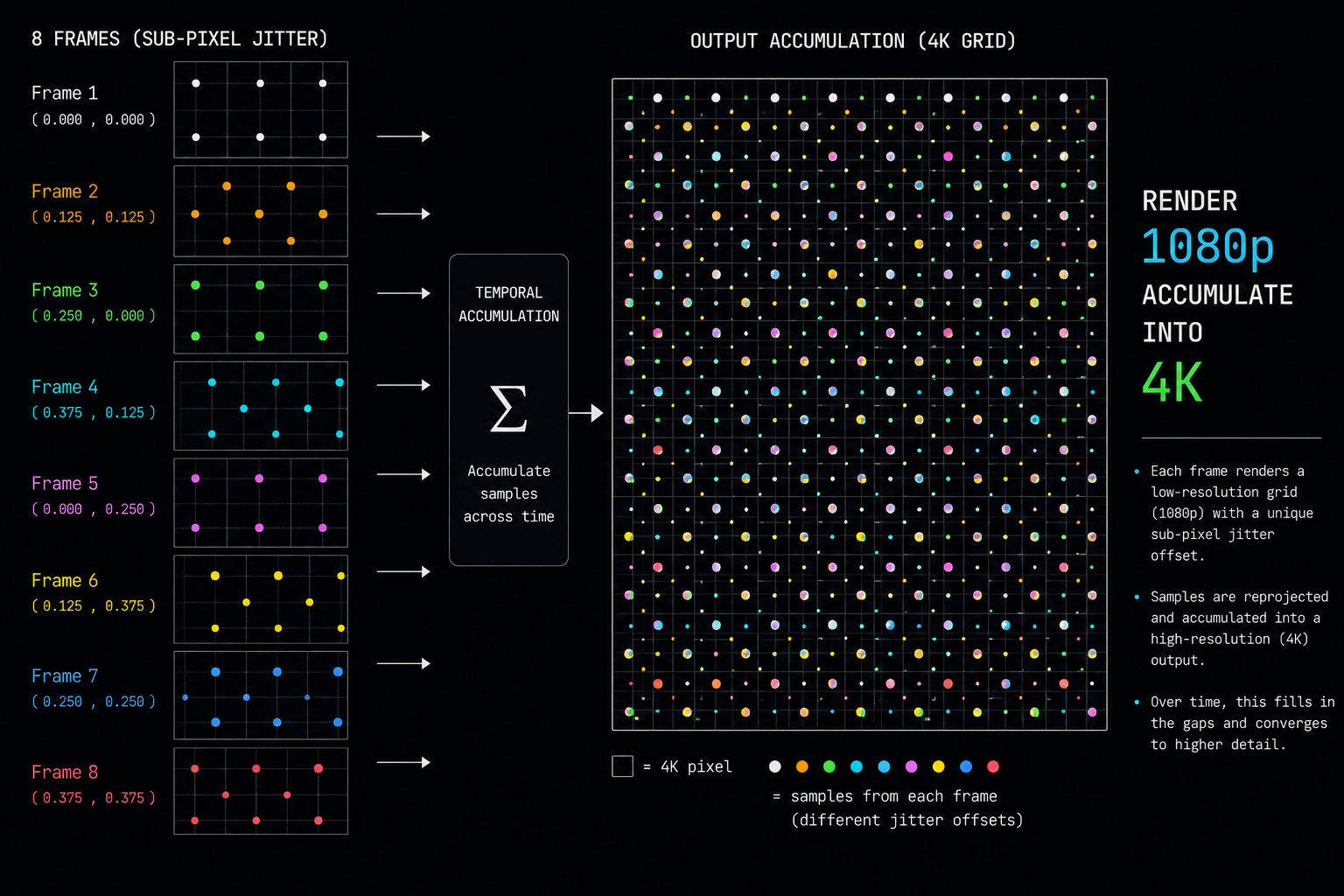
Once you can accumulate sub-pixel information across frames, you don't have to be aiming at the same resolution. You can render the new frame at lower resolution, and accumulate it into a higher-resolution history buffer. Over enough frames, the history converges to a true high-resolution image.
This is TAA upsampling or TAAU. Unreal Engine added it in 4.19 (2018). It works. It is the direct ancestor of DLSS, FSR 2, XeSS, and PSSR. Every modern "AI upscaler" is, at its heart, TAAU with the hand-tuned color clamping and history validation logic replaced by a neural network that does a much better job.
In the next chapter we'll look at the data structure that makes all of this possible: motion vectors, what they really are, how the engine produces them, and why getting them wrong is the single biggest source of artifacts in every upscaler.