
Motion Vectors: The Most Important Texture in Modern Games
Per-pixel arrows pointing into the past. Every temporal technique depends on them.
If TAA, DLSS, FSR, XeSS, and PSSR have one thing in common, it is that they would all completely fall apart without motion vectors. A motion vector is a per-pixel 2D vector that says: "this pixel was at position (x', y') in the previous frame." It is the bridge between today's frame and yesterday's frame, and the entire industry has spent ten years getting better at producing it.
Definition
For each pixel on screen with current coordinates (x, y), the motion vector MV(x, y) is a 2D offset such that:
previous_position = (x, y) + MV(x, y)
Some engines store it the other way around (current = previous + MV); the convention varies. The magnitude is in pixel units, or sometimes in normalized device coordinates (NDC) so it is resolution-independent.
A motion vector texture is usually stored as an R16G16_FLOAT or R16G16_SNORM two-channel texture at full screen resolution. Red is the X offset, green is the Y offset, scaled to fit the format.
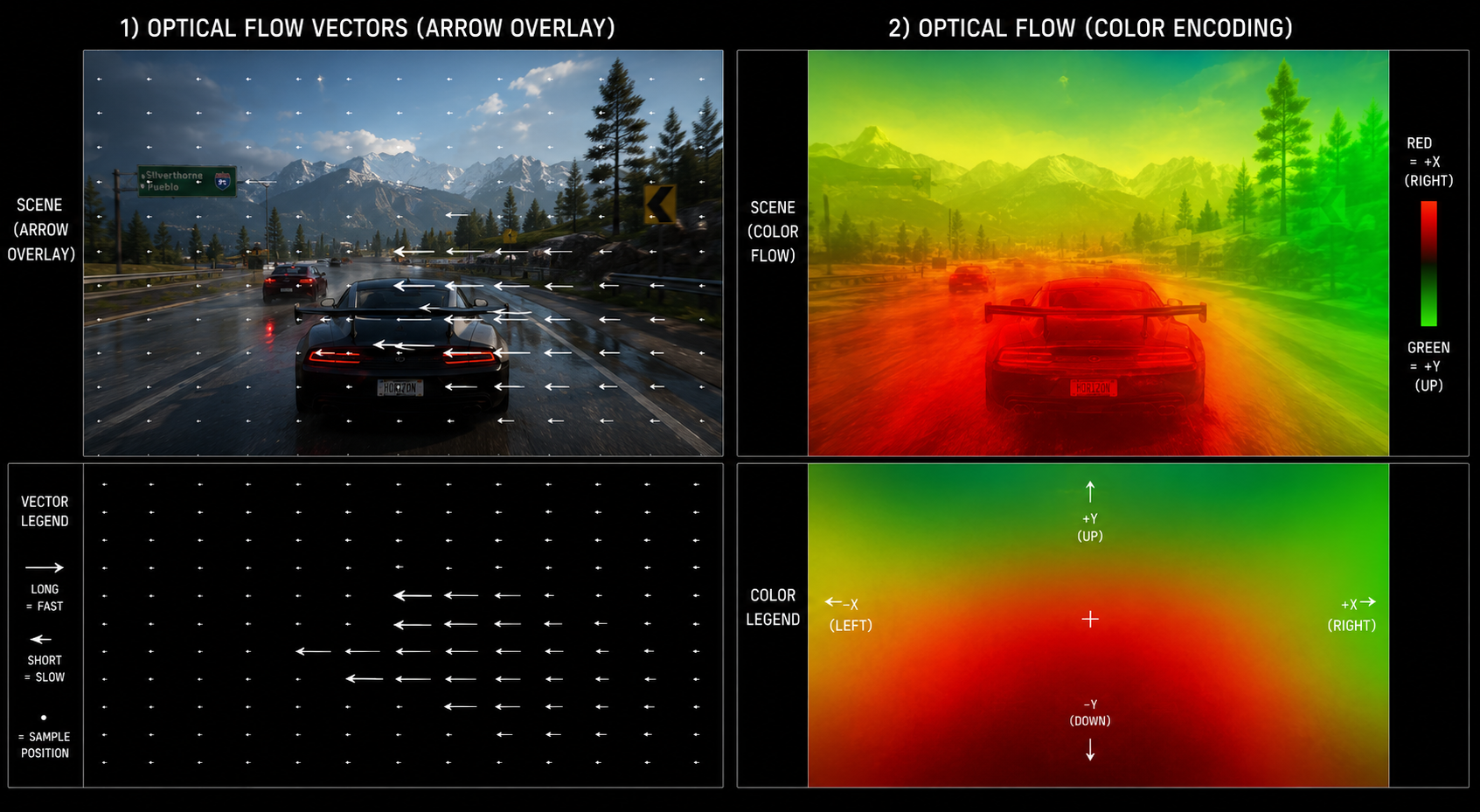
Where motion vectors come from
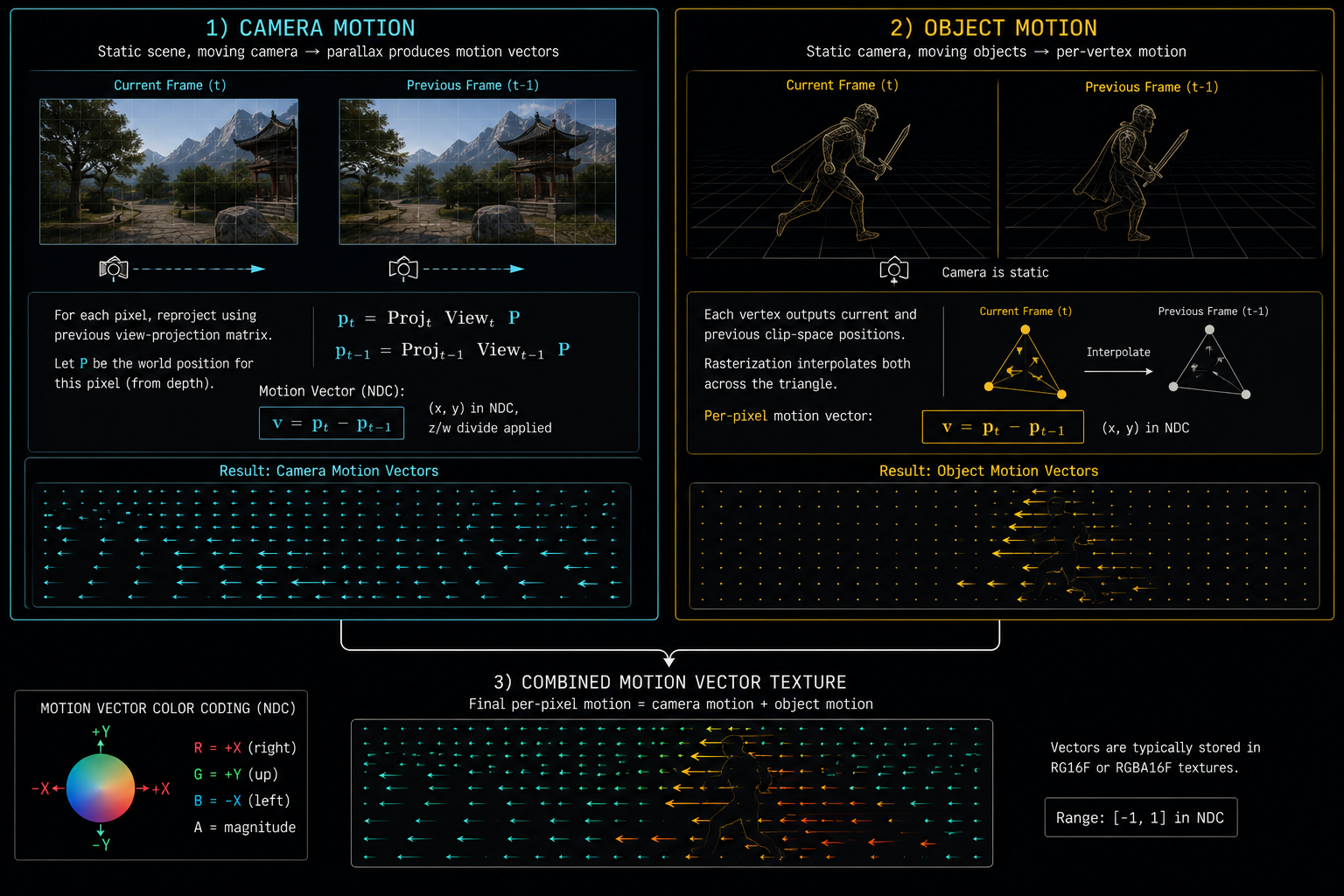
There are two sources, and a real engine combines both.
1. Camera motion (analytical, per-pixel)
If you know the camera's view-projection matrix for this frame and last frame, and you know the pixel's world position (from depth), you can compute exactly where that pixel was in the previous frame. This is pure math, dead accurate, free.
vec4 worldPos = reconstructWorld(uv, depth, invViewProj);
vec4 prevClip = prevViewProj * worldPos;
vec2 prevUV   = prevClip.xy / prevClip.w * 0.5 + 0.5;
vec2 motion   = prevUV - uv;
This handles camera rotation, translation, and FOV change perfectly. It does not handle moving objects, because it assumes the world is static.
2. Object motion (rendered per-object)
For every moving object characters, vehicles, projectiles, swaying foliage the engine renders an additional pass into the motion vector buffer. For each vertex it computes the current clip-space position and the previous-frame clip-space position (using the previous bone matrices for skinned meshes), and the fragment shader writes the screen-space delta.
This combined motion vector buffer is one of the channels of the G-buffer we mentioned earlier. Producing it correctly for every moving thing in the scene is one of the most error-prone parts of an engine, and bad motion vectors are the cause of about 80% of upscaler artifacts.
What motion vectors do NOT capture
This is critical, and it is where every modern upscaler bleeds artifacts:
| Phenomenon | Captured by MVs? | Why |
|---|---|---|
| Camera pan | Yes | Pure analytical math |
| Walking character | Yes | Per-bone object motion |
| Particles | Sometimes | Engine must explicitly write them |
| Shadows | No | A shadow is a result, not geometry |
| Reflections | No | The reflected object moves in mirror-space |
| Specular highlights | No | They slide across the surface as the camera moves |
| Transparency | Partial | Only the closest layer's motion is recorded |
| Caustics, refraction | No | Light moves, geometry doesn't |
| Procedural animation in shaders | No | The shader changes between frames, but the geometry doesn't move |
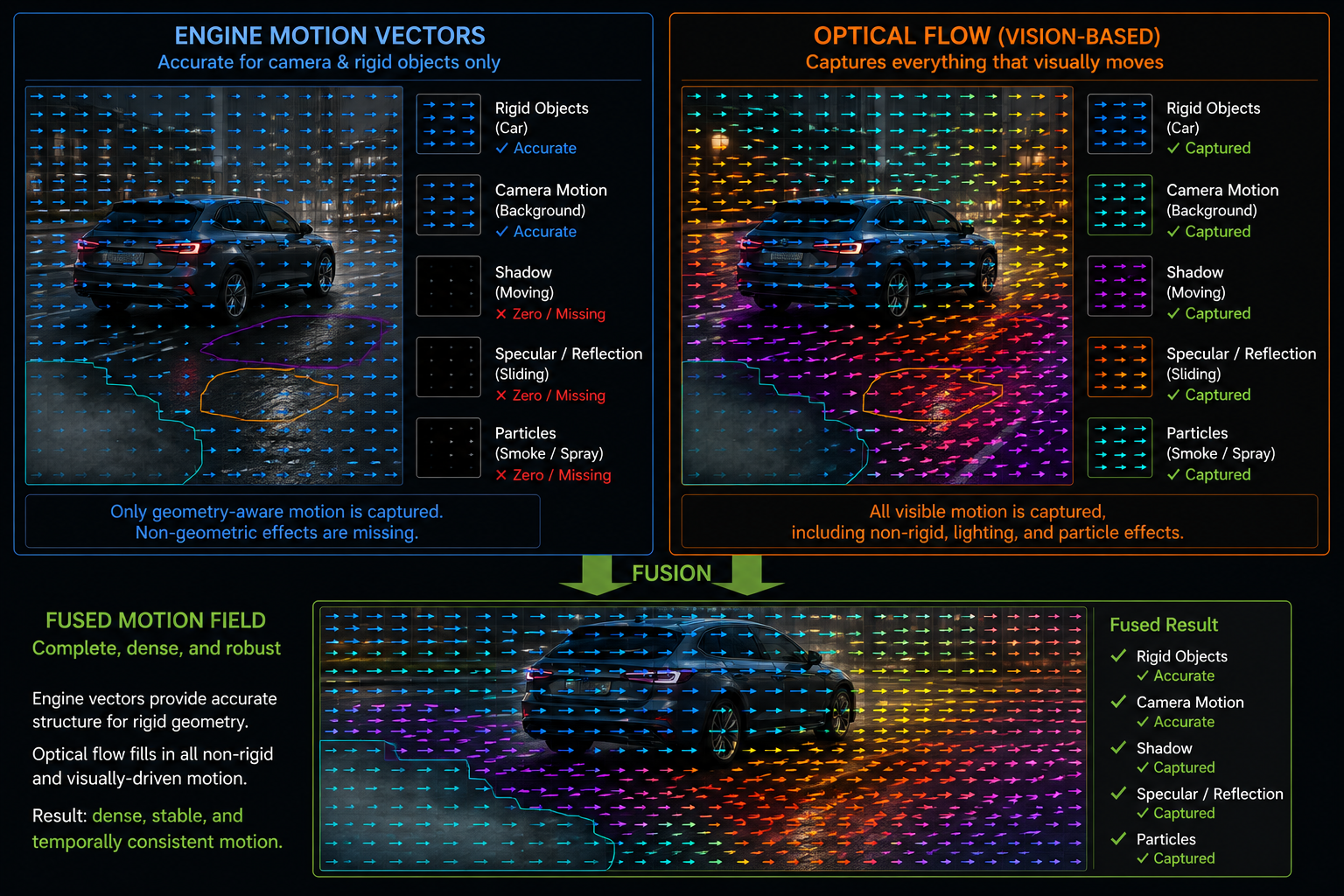
So when you look at a TAA or DLSS output and see a reflection that ghosts, a shadow that smears, or a fire that leaves trails that is the upscaler failing to invalidate history because the motion vector said the pixel didn't move, but the appearance changed anyway.
This is why DLSS, FSR 2+, XeSS, and PSSR all rely on neural networks: the network learns to detect these "the motion vector lied" cases and reject history in a smarter way than a hand-tuned heuristic ever could.
Sub-pixel precision and resolution
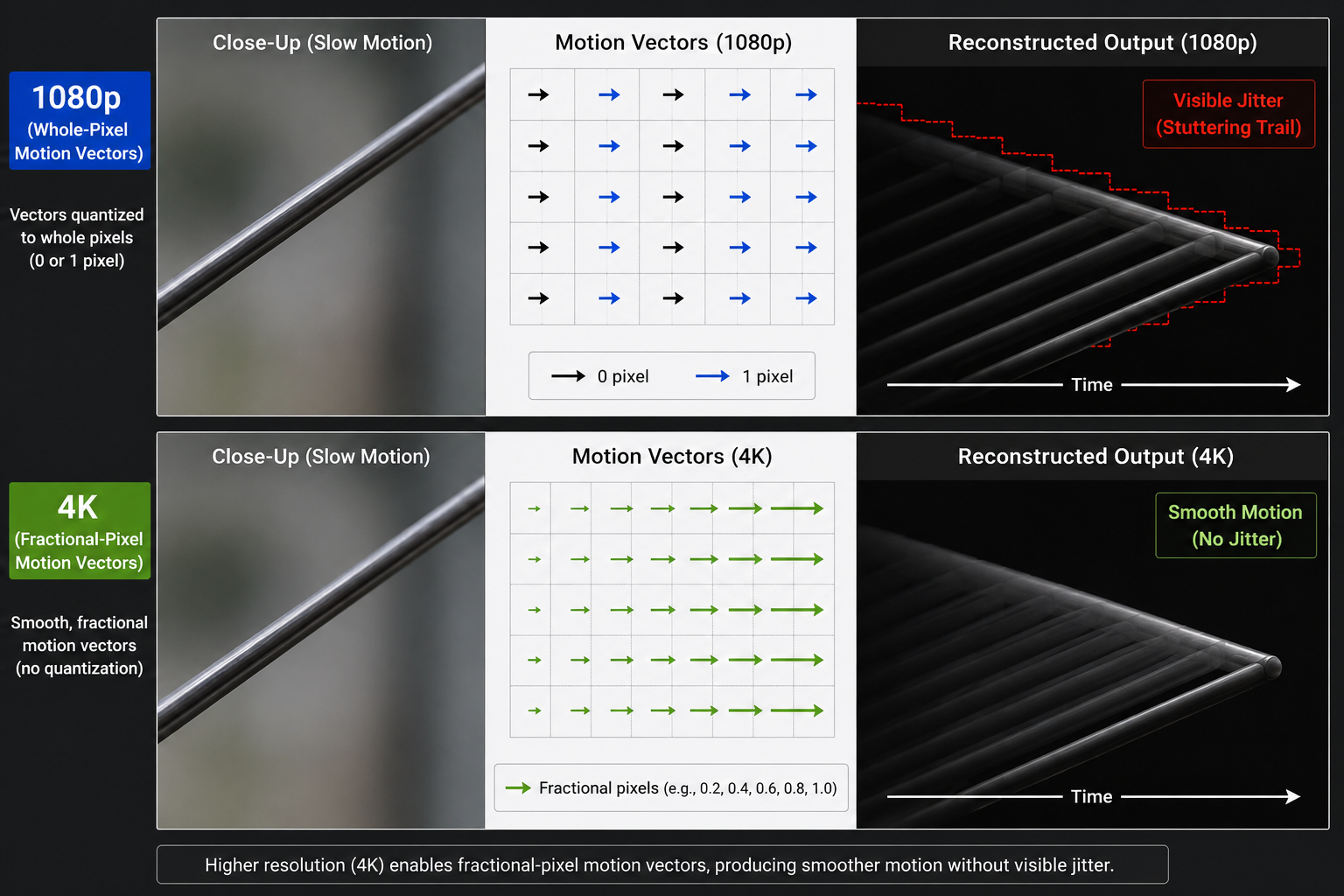
Motion vectors are normally rendered at the internal (low) resolution of the renderer, not the output resolution. This is fine when the upscaler is sample-based it samples motion at the internal resolution and works there but it means motion-vector quantization can cause visible jitter for slowly moving objects, where the MV rounds to zero one frame and to one pixel the next.
Some engines now render motion vectors at higher resolution than color, or at full output resolution even when color is at internal resolution, just to give the upscaler clean motion data.
Reverse reprojection vs forward reprojection
Two camps:
- Reverse reprojection (what TAA and DLSS Super Resolution do): for each output pixel, look up where it came from in the previous frame. Easy, deterministic, never produces holes.
- Forward reprojection (what some frame-generation techniques do): for each input pixel, scatter it to where it will be in the next frame. Can produce holes and overlap, but is essential when you need to predict the future, not reproject the past.
DLSS 3 Frame Generation uses both: it has the motion vectors for the past (the rendered "real" frame N and "real" frame N+1), but it must forward-warp halfway between them to produce the generated frame N.5. We will look at exactly how in chapter 9.
A pure-vision alternative: optical flow
What if you don't have motion vectors at all? What if you only have two images and need to figure out the motion between them? That problem is optical flow a classical computer vision technique going back to the Horn–Schunck (1981) and Lucas–Kanade (1981) algorithms. Modern hardware optical flow accelerators (like the Optical Flow Accelerator on NVIDIA Ada/Blackwell GPUs) compute per-pixel motion between two arbitrary images in under a millisecond.
This is the second pillar of DLSS 3 Frame Generation: engine motion vectors plus hardware optical flow, fused together, give the network a better motion field than either source alone could.
In the next chapter we will look at upscaling itself: spatial vs temporal, why spatial upscaling alone is doomed, and what neural reconstruction actually adds on top of TAA upsampling.