
FSR, XeSS, and the Latency Problem
Cross-vendor reconstruction, and why a 240 FPS game can feel like 60.
This chapter has two halves. First the cross-vendor alternatives to DLSS AMD's FSR family and Intel's XeSS because their design constraints are instructive. Then the latency problem: why a game running at "240 FPS" with frame generation does not respond to your input like a 240 FPS game would, and what Reflex-class technologies do about it.
FSR: the open alternative
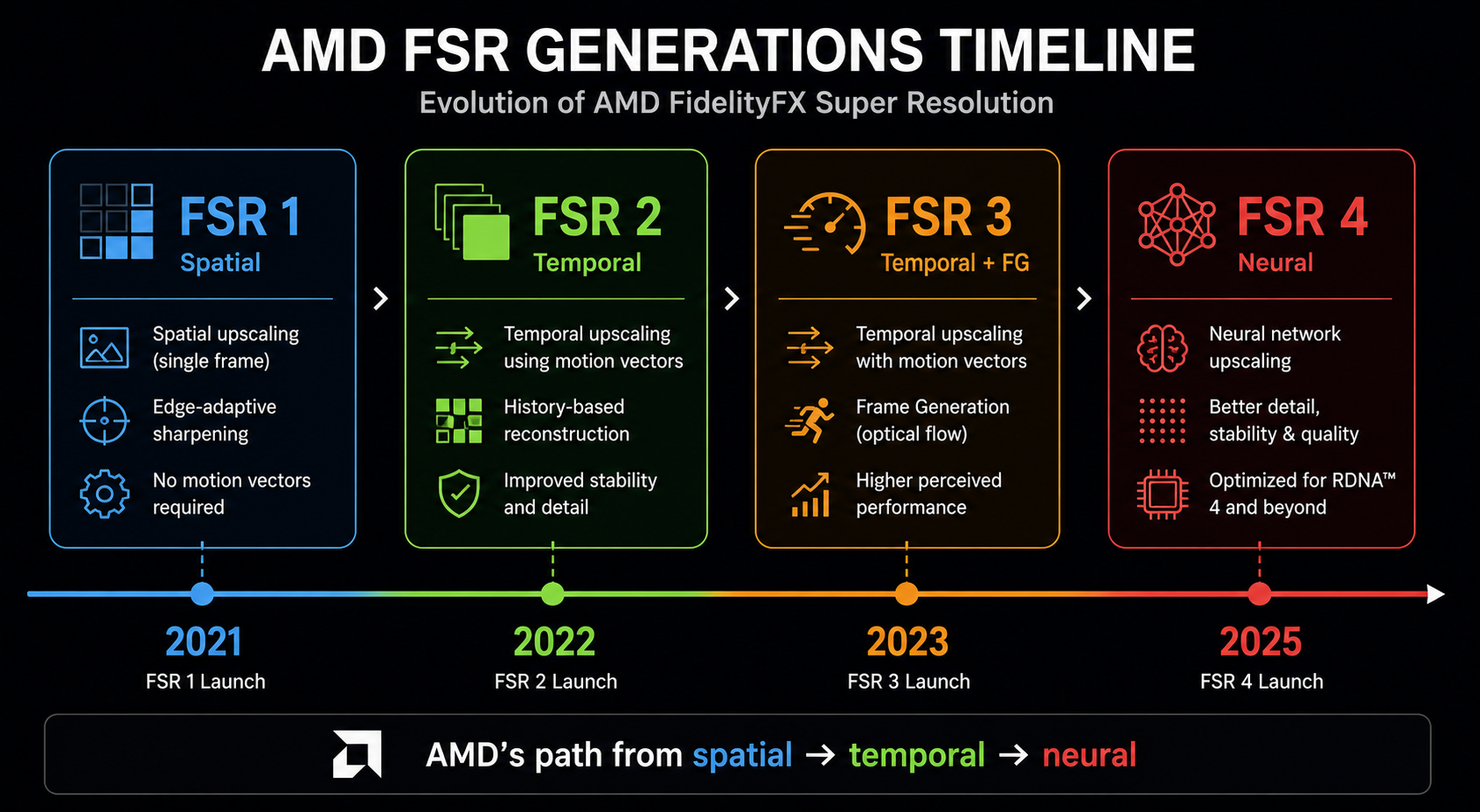
AMD's FidelityFX Super Resolution is open-source and cross-vendor it runs on NVIDIA, Intel, and console GPUs. It has gone through four major revisions:
- FSR 1 (2021) spatial only. Discussed in chapter 6. Mostly obsolete.
- FSR 2 (2022) temporal, hand-tuned (no neural network), broadly comparable to DLSS 2 in motion-stable shots but worse in motion. Runs on essentially any modern GPU.
- FSR 3 (2023) adds frame generation as a separate, hand-tuned (not neural) algorithm built on optical flow + motion vectors, running on shader cores. Image quality of the generated frames is below DLSS 3.
- FSR 4 (2025) finally a neural network, trained for RDNA 4's new ML units. Image quality leaps closer to DLSS in independent comparison. AMD has committed to making FSR 4 work on older AMD GPUs eventually, with reduced features.
The interesting tension here: FSR 1–3 was deliberately not a neural network because AMD chose to ship a technique that works on every GPU. The cost of that decision was image quality. FSR 4 abandoned that constraint and immediately became substantially better at the price of being effectively RDNA-4-tier-only.
Why FSR 2/3 looks worse despite the same idea
DLSS and FSR 2/3 have nearly identical architectural shape both are temporal upscalers consuming jittered color, motion vectors, depth, and a history buffer. The difference is what happens inside the box.
DLSS uses a neural network with millions of parameters trained on millions of examples. FSR 2/3 uses a small number of hand-tuned operations: color clamping in a custom color space, depth-based history validation, reactive masks for transparency, and a custom upsampling kernel. Both can produce excellent stills; in motion, the neural network handles edge cases the hand-tuned filter misses, especially:
- Thin-feature handling (wires, hair, antennae). DLSS holds them better.
- Disocclusion fill. DLSS regenerates faster; FSR shows fizzle for longer.
- Reactive surfaces (water, specular). DLSS is less prone to oily smearing.
FSR 4 closes most of this gap by, predictably, replacing the hand-tuned heuristics with a learned function the exact same transition DLSS made between 1 and 2.
XeSS: Intel's two-tier design
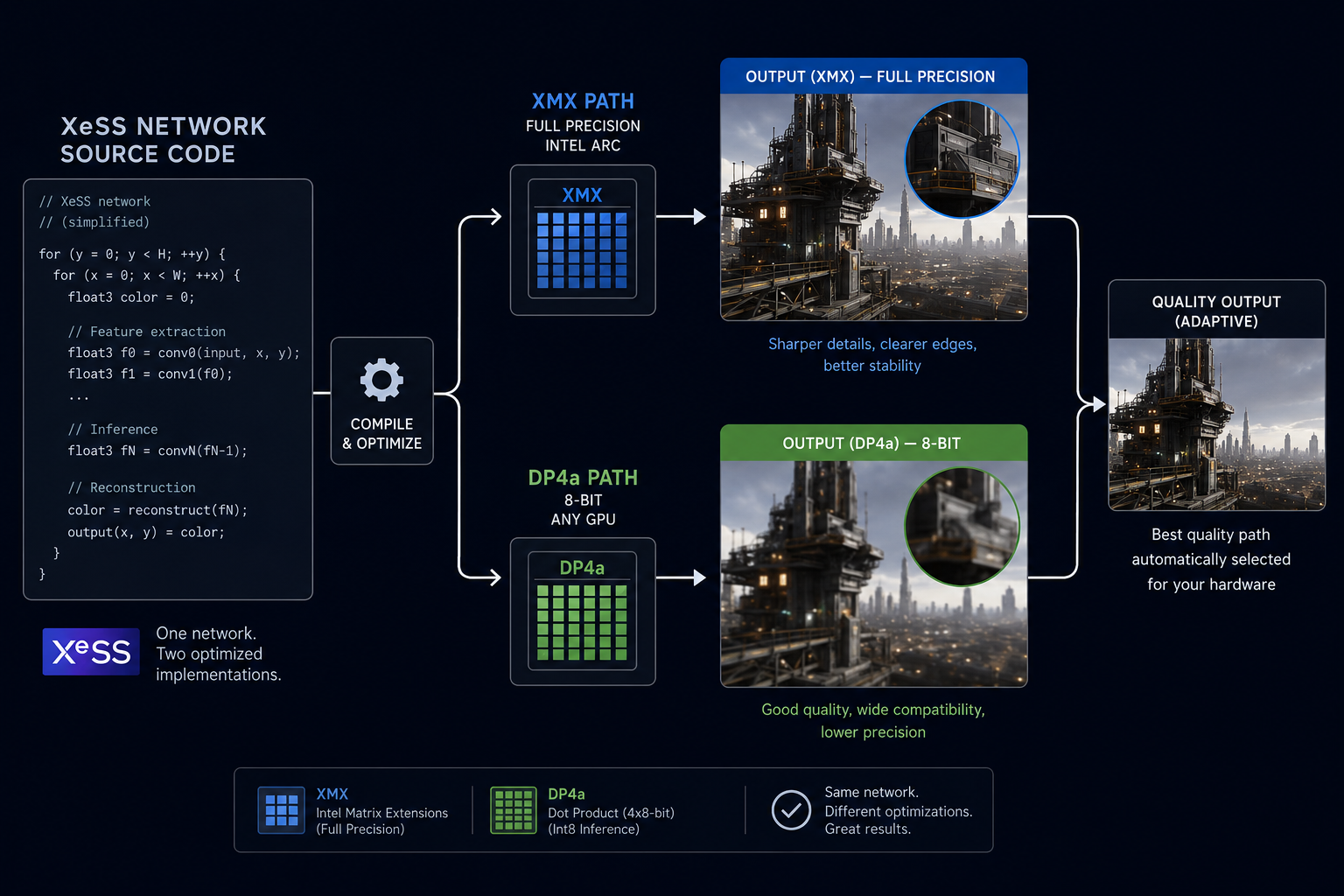
Intel's XeSS is a temporal neural upscaler in the DLSS family. What makes it distinctive: Intel ships it in two versions from the same codebase.
- XeSS XMX path runs on Intel Arc GPUs' XMX matrix units, full network, full quality. Comparable to DLSS 2 / 3.
- XeSS DP4a path same network, compiled to use the
DP4a(8-bit integer dot product) instruction supported on essentially every modern GPU. Lower quality (smaller network, less precision), but cross-vendor.
This is engineering pragmatism. By shipping the same network in two precisions/sizes, Intel can claim "best quality" on its own hardware while still being a real cross-vendor option. AMD has, with FSR 4, moved closer to this same model.
The cross-vendor lesson
The trajectory is consistent across all three vendors:
Hand-tuned heuristics → small neural network on general hardware → bigger neural network on specialised hardware.
The economics push everyone in the same direction. Specialised matrix-math hardware is cheap to add to a GPU because game-rendering already wants it for ray-tracing denoisers, lighting probes, and asset compression. Once you have it, you may as well use it for upscaling. Once you use it for upscaling, you tend to win on quality.
This is why every new GPU architecture in 2025–2026 has dedicated ML acceleration: NVIDIA Tensor Cores, AMD AI Accelerators, Intel XMX, Apple Neural Engine, Sony's PS5 Pro custom block, and Microsoft's "AI capability" for the next Xbox. Reconstruction is the killer app that justifies all of them.
Part two: the latency problem
Now to the part that ships with every frame generation marketing slide as fine print.
What latency means here
When you press a key, several things happen before the resulting frame reaches your eye:
- Input poll the game samples the keyboard/mouse/controller.
- CPU simulation physics, animation, AI, gameplay logic update the world state.
- CPU render command buffer the engine builds the GPU draw list for the new state.
- GPU render the GPU executes the draw list.
- Display scan-out the finished frame is sent to the monitor.
The end-to-end latency is the sum of all this typically 30–60 ms in a normal game pipeline, low enough to feel responsive. Frame generation adds to this number because of how it has to be sequenced.
Why FG adds latency
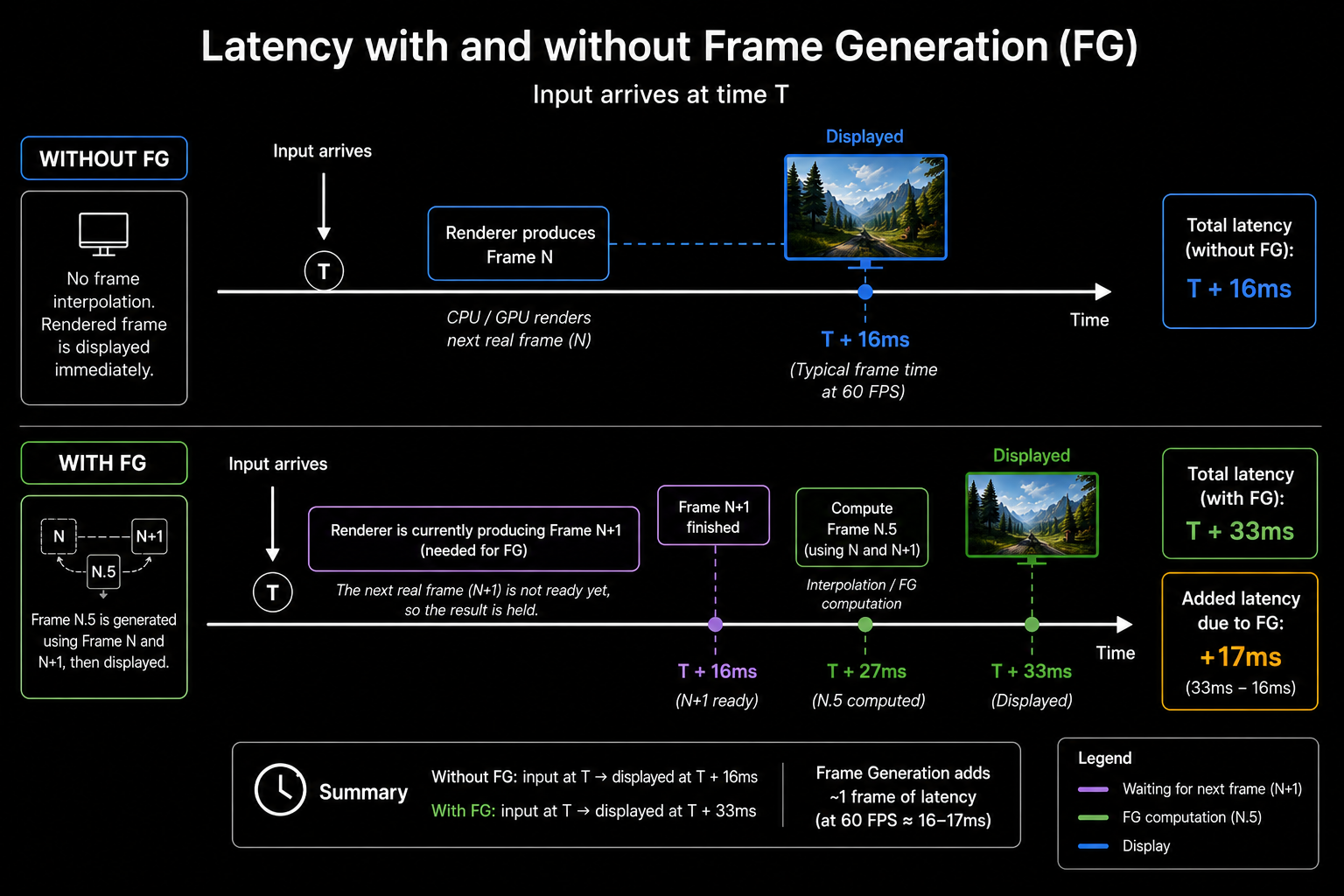
Recall from the previous chapter: to produce generated frame N.5, you need both rendered frame N and rendered frame N+1. Which means rendered frame N+1 must already be available before you can show N.5. Which means rendered frame N is held back by the engine until N+1 is ready otherwise it would be displayed before N.5, breaking the pacing.
Result: every rendered frame is delayed by one render interval before display. At 60 rendered FPS that's 16.6 ms of added input-to-photon latency. The displayed frame rate is 120, but the responsiveness feels like 30 FPS slower than if you just played at 60 with no FG.
NVIDIA Reflex (and equivalents)
Reflex is NVIDIA's solution. It is not a single technique but a bundle of latency-reduction mechanisms:
- Reduced render queue. Normally the CPU runs 1–3 frames ahead of the GPU to keep the GPU busy. Reflex pegs this at 0–1 frames. Throughput drops slightly, latency drops a lot.
- GPU-paced CPU. The CPU starts simulating a new frame just in time for the GPU to start rendering, not earlier. The simulated state therefore reflects the most recent input.
- Driver-level coordination. The driver communicates frame timing back to the engine so the simulation tick aligns with display scan-out, not arbitrary clock time.
Reflex by itself (in a non-FG game) reduces end-to-end latency by 10–40 ms. With FG enabled, Reflex is mandatory NVIDIA's runtime refuses to enable FG without Reflex on because it cancels out most of the latency penalty FG adds.
AMD has an equivalent called Anti-Lag 2 (formerly Anti-Lag+, integrated into the engine rather than the driver, after the original driver-level Anti-Lag had compatibility problems). Sony's PS5 platform has similar in-OS scheduling controls. Intel has a less developed equivalent.
The honest accounting
With Reflex and frame generation together:
| Setting | Render FPS | Display FPS | Roughly equivalent input latency |
|---|---|---|---|
| Native, no Reflex | 60 | 60 | 60 FPS |
| Native + Reflex | 60 | 60 | ~80 FPS feel |
| FG + Reflex | 60 | 120 | ~50 FPS feel |
| FG + Reflex (well above CPU bottleneck) | 120 | 240 | ~100 FPS feel |
The pattern: FG always raises display rate, but only maintains input latency relative to non-FG; it never improves it. Reflex separately reduces latency, and the combination is roughly latency-neutral compared to a Reflex-only non-FG configuration. So FG's honest benefit is motion smoothness, not responsiveness.
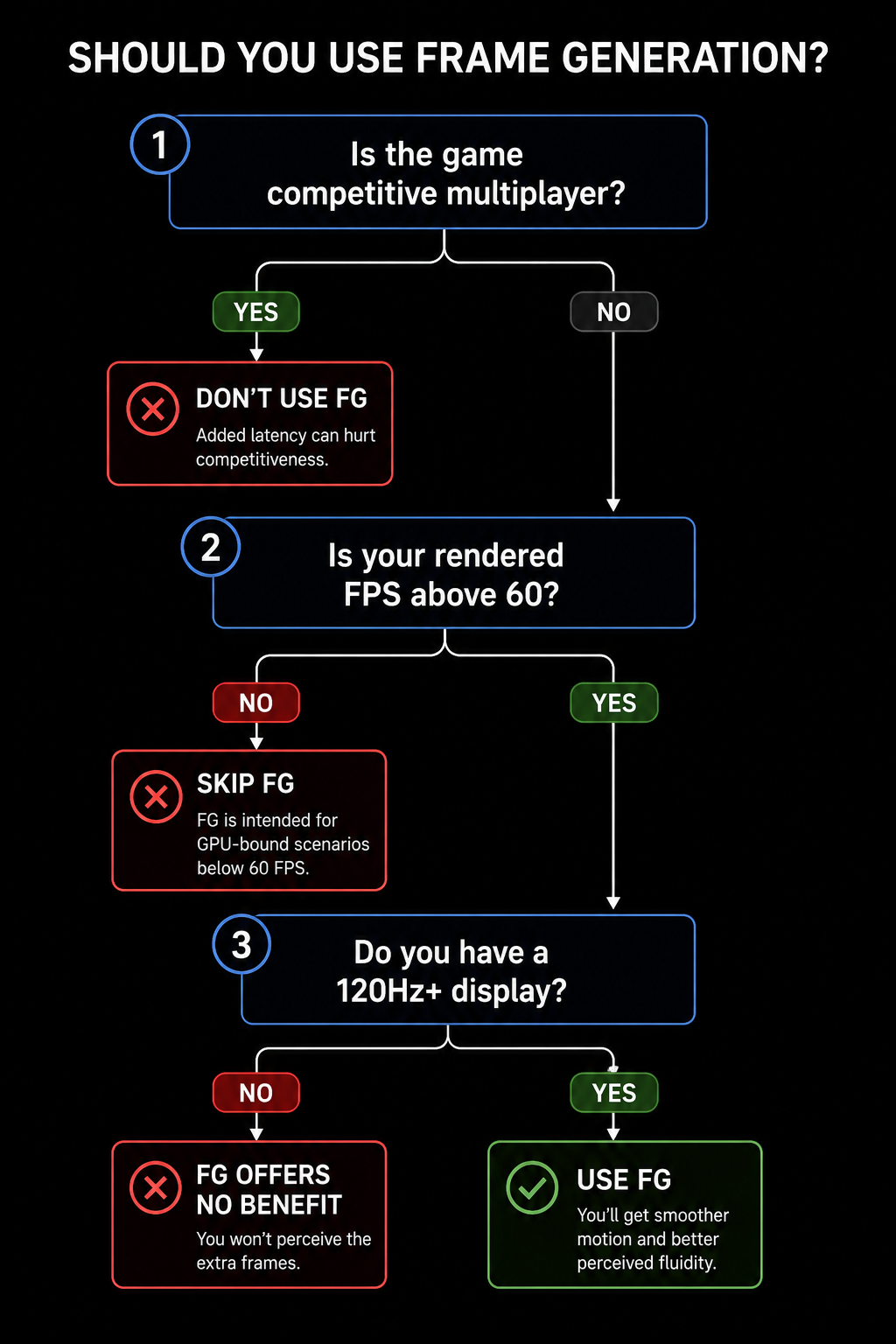
When to use FG, when not to
A reasonable rule:
- Single-player, visually rich games: FG is a clear win. Cyberpunk, Alan Wake, Hogwarts Legacy all feel better at 120 displayed FPS even with the slight latency penalty.
- Competitive multiplayer: FG is rarely worth it. Counter-Strike, Valorant, Apex players care about latency, not motion clarity.
- Below ~40 rendered FPS: don't. The interpolation artifacts become visible and the latency added is intolerable.
In the next chapter we'll look at the artifacts themselves what causes ghosting, smearing, disocclusion fizzle, and "shimmer" at the algorithmic level because that vocabulary lets you read any DF-style image comparison correctly.